13 Best Photography Website Templates for Webflow and Framer (2026)

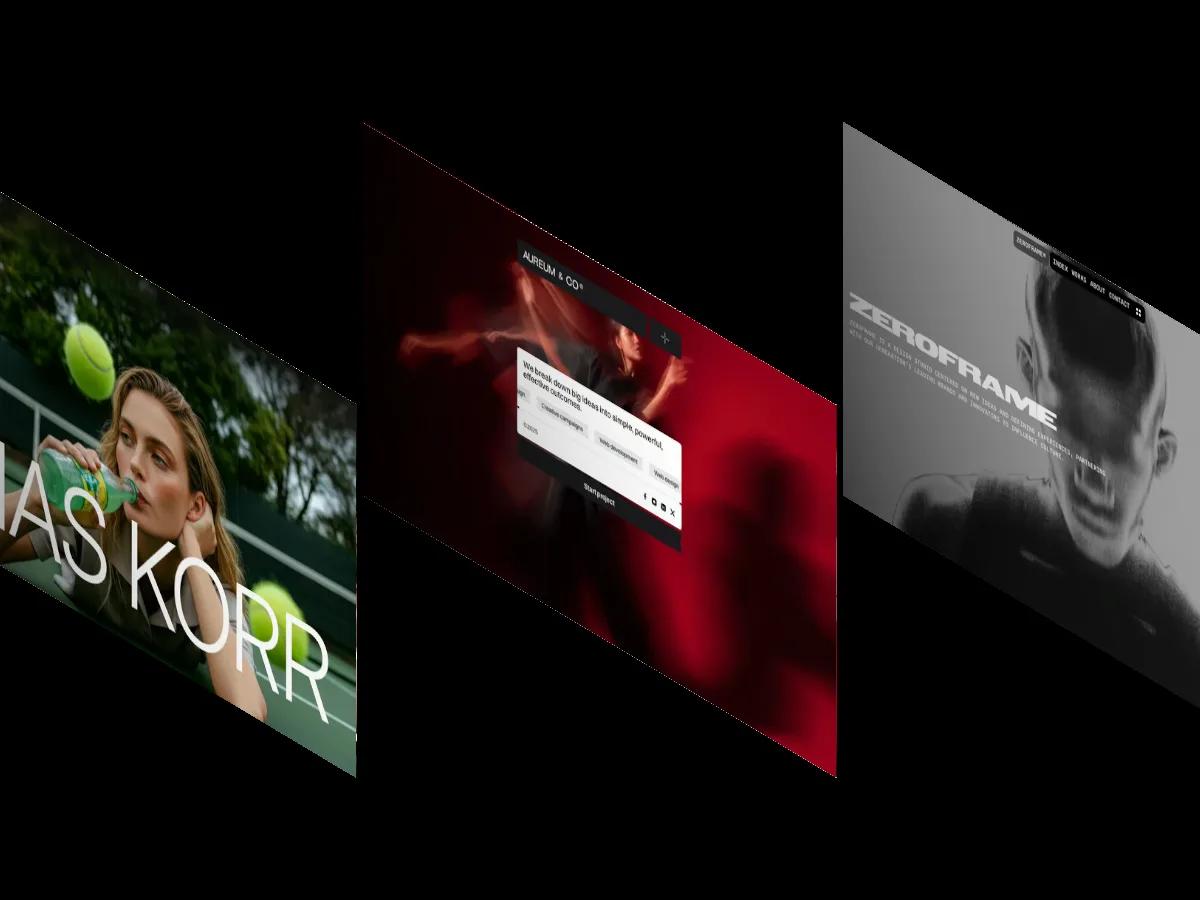
We have scored 235 photography and videography templates. These 13 photography website templates are the ones we would shortlist, from filterable photo archives and split-screen portfolios to video-led studio sites, with four free picks.
Photographers have a problem other creatives don't: the template has to get out of the way. A photography website template with loud type, busy gradients or cramped grids makes good pictures look worse, and you often only notice after you've loaded thirty of your own images into it.
We've scored 235 templates in our library with the Photography & Videography tag, across Webflow, Framer and Shopify. The 13 below are the ones we'd shortlist for photographers and videographers, all on Webflow or Framer, ranked by Overall Score. Four are free, and five are built around video rather than stills.
What Our Photography Template Scores Show
Photography templates score well as a group. The category averages 8.4/10 overall, the highest of any category in our library with more than 200 templates, and 76 of the 235 sit at 8.5/10 or higher. Framer has the most of them (136), Webflow has 92, and Shopify has 7.
Webflow photography templates average 8.4/10 overall, Framer 8.3/10. The bigger difference is price: 70 of Framer's 136 photography templates are free, against 8 of Webflow's 92. Every one of them cleared our 7.0 minimum before it was published. Browse the full set on our photography and videography templates page.
How to Choose a Photography Website Template
Look at the gallery first, then the platform.
Gallery format. Full-bleed, one-image-per-row layouts suit editorial and documentary work. Dense grids suit volume: event, wedding and commercial photographers with hundreds of frames. Category filters (portrait, editorial, architecture) matter once you shoot more than one kind of work, and an archive by year keeps older projects reachable without crowding the homepage.
Background color. Dark templates make color photography glow and can flatten low-key images. Light templates are more forgiving. Twenty templates in the category ship a built-in light and dark theme, which lets you test both with your own work.
Video. Videographers should look for background video support and project pages that handle embeds well. 40 templates in the category support background video.
Selling and booking. None of the 13 templates below includes a shop, so if print sales are the main purpose, Shopify is the obvious route. If you book shoots, check for a services page and a working contact form, because several strong templates here have neither.
On platforms: Framer suits a focused, motion-led portfolio you want live quickly; browse the Framer photography templates. Webflow suits larger archives and a regular journal; see the Webflow photography templates. Shopify suits print sales, but none of the seven Shopify photography themes, priced $250 to $400, is built as a photographer's own portfolio, so none made this list.
The 13 Best Photography Website Templates, Ranked
Every entry links to our review page, where a screen recording of the full homepage plays next to the score breakdown.
Elias
Design: 9.5/10
Dev: 9.5/10
Price: $79
Best for: photographers who want a filterable gallery and a year-by-year archive in a light, quiet layout
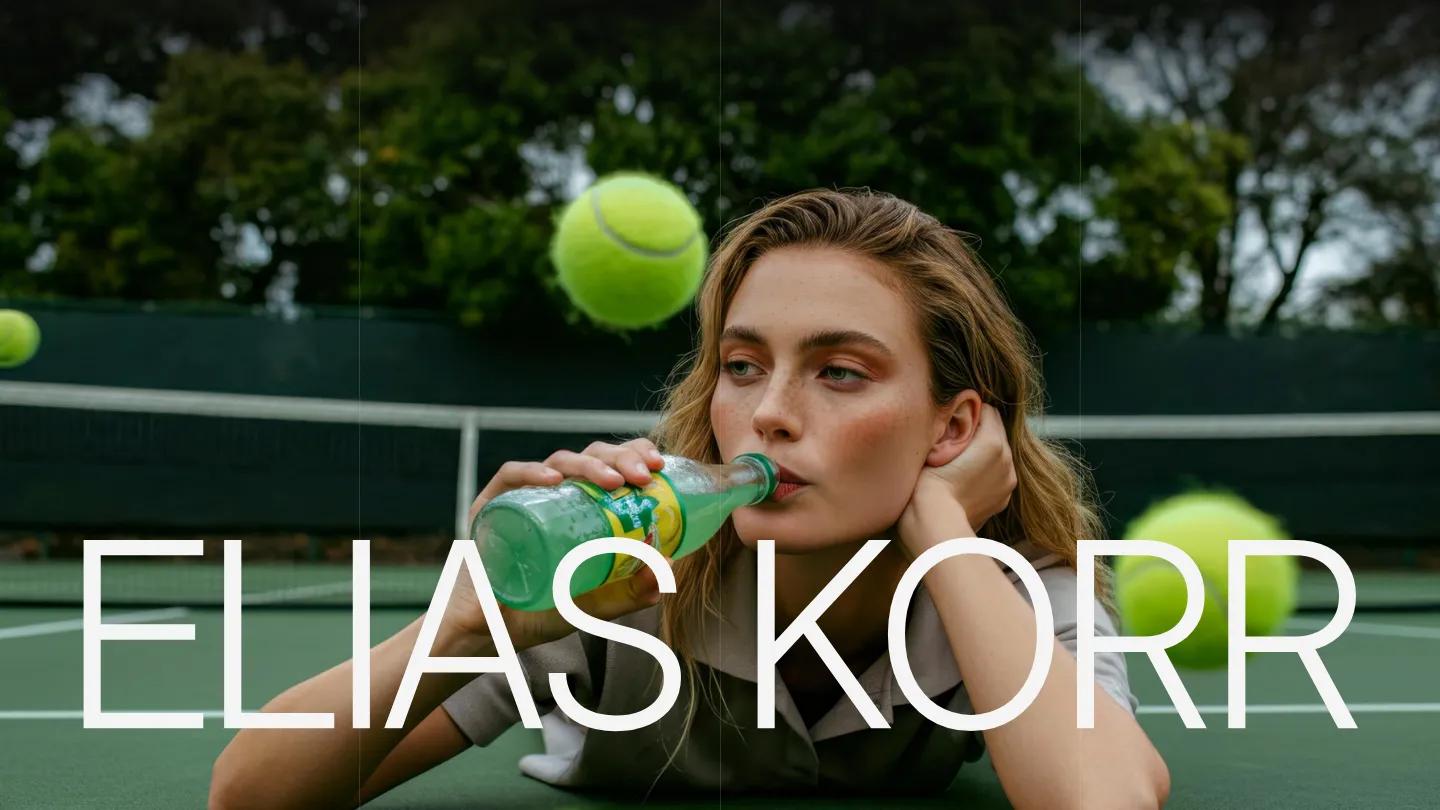
Elias is the most photographer-specific pick on this list. The name sits in ultra-thin capitals over a full-screen photo, and the type relies on letter spacing and scale rather than weight. The works gallery is filterable, and a timeline groups past work by year.
Project pages stack full-width images with short captions, which suits photo essays. Projects run through the CMS, and thumbnails fill the screen width on a phone without awkward crops.
Worth knowing: copy is minimal throughout, so photographers who sell services with long explanations will find it sparse.
Rabah
Design: 9.4/10
Dev: 9.6/10
Price: $99
Best for: working photographers who sell shoots and want case studies with client testimonials built in
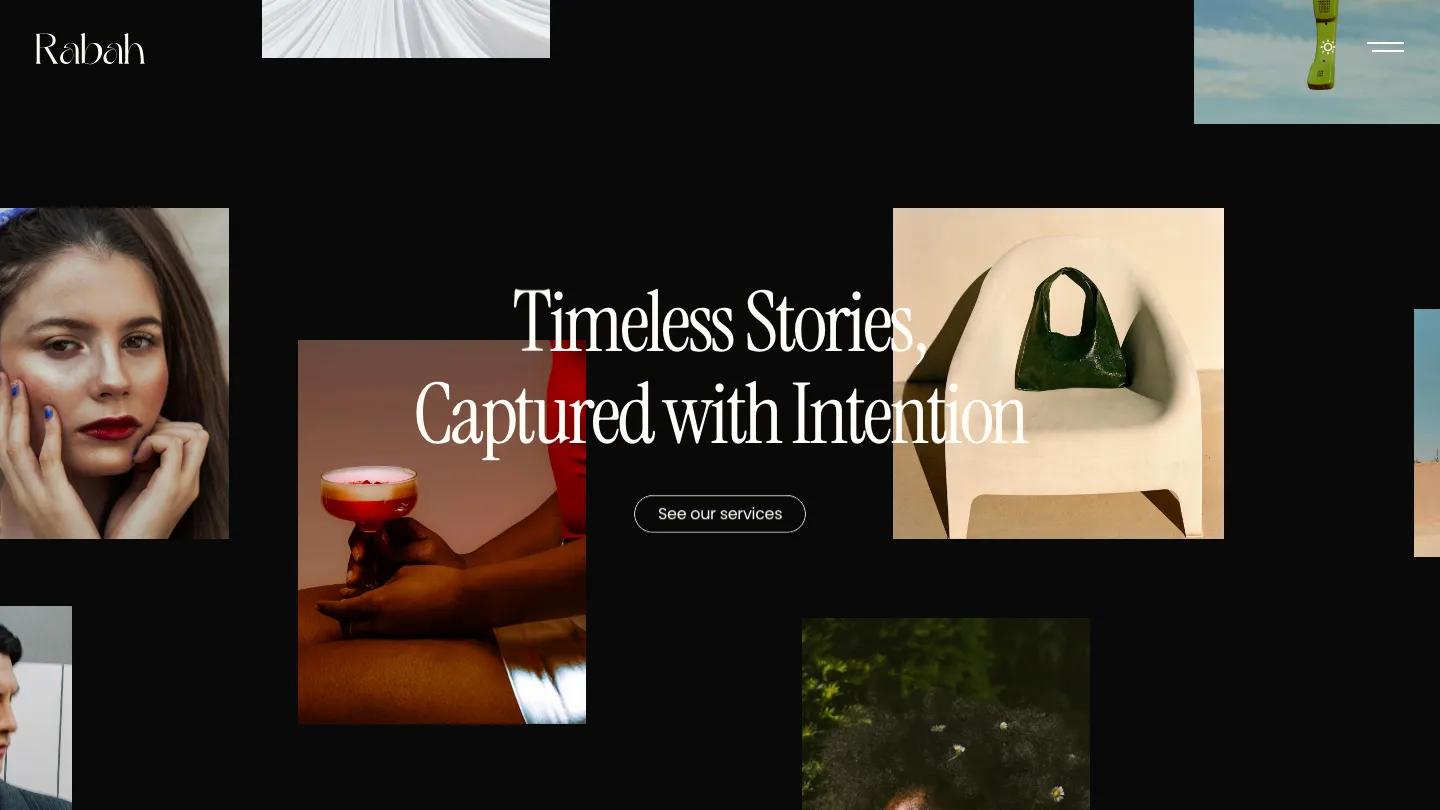
Rabah opens on a dark collage of overlapping portrait and product photos with a tall serif line centered over it. Case studies show the year, service type and a client testimonial next to full-width images, which gives commercial work context without long copy.
A services page, an about page and a light and dark toggle in the header are included, and projects run through the CMS. The case study grid keeps generous space around each image.
Worth knowing: in our review the contact page used email and phone links rather than a form, so plan how inquiries will arrive.
Plutarch

Design: 9.4/10
Dev: 9.6/10
Price: $59
Best for: filmmakers and video production studios whose work is footage, not stills
Plutarch is built for moving images. The homepage plays full-screen video under the studio name, and every project tile sits directly over its own video or image, so the grid works like a reel. Fiery orange and deep black dominate the demo.
Project detail pages are text-led, with a project code, client, category, description and list of services. Projects run through the CMS, and the background video scales down cleanly on a phone.
Worth knowing: the demo shows only a handful of projects, so a large archive or several service pages means extending the structure.
OXR
Design: 9.4/10
Dev: 9.6/10
Price: Free
Best for: directors and production companies that want a free, cinematic site with a budget field on the contact form
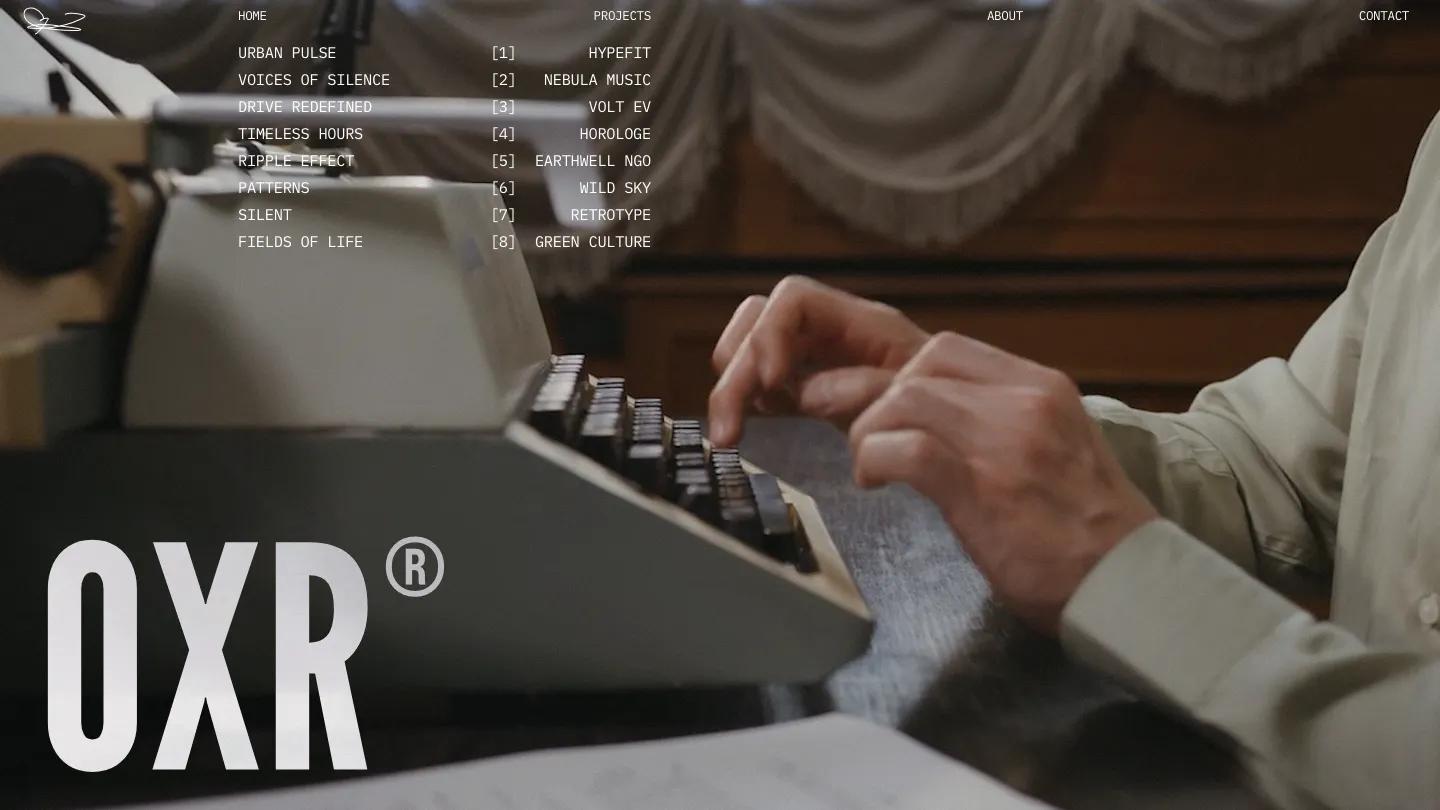
OXR is the strongest free template we've scored for video work. A full-screen video hero sits under a large trademark-style logo and a monospace project list that reads like a film slate. Project pages carry metadata such as duration and location, which suits commercial video work.
The contact page includes a form with name, email and budget fields and a button to schedule a call, and the homepage has room for testimonials and recognition. Projects run through the CMS.
Worth knowing: the monospace body text gets tight on phones, so check longer paragraphs at mobile width.
Chapters
Design: 9.4/10
Dev: 9.4/10
Price: $129
Best for: photo and film studios that need services, journal, team and careers pages around the portfolio
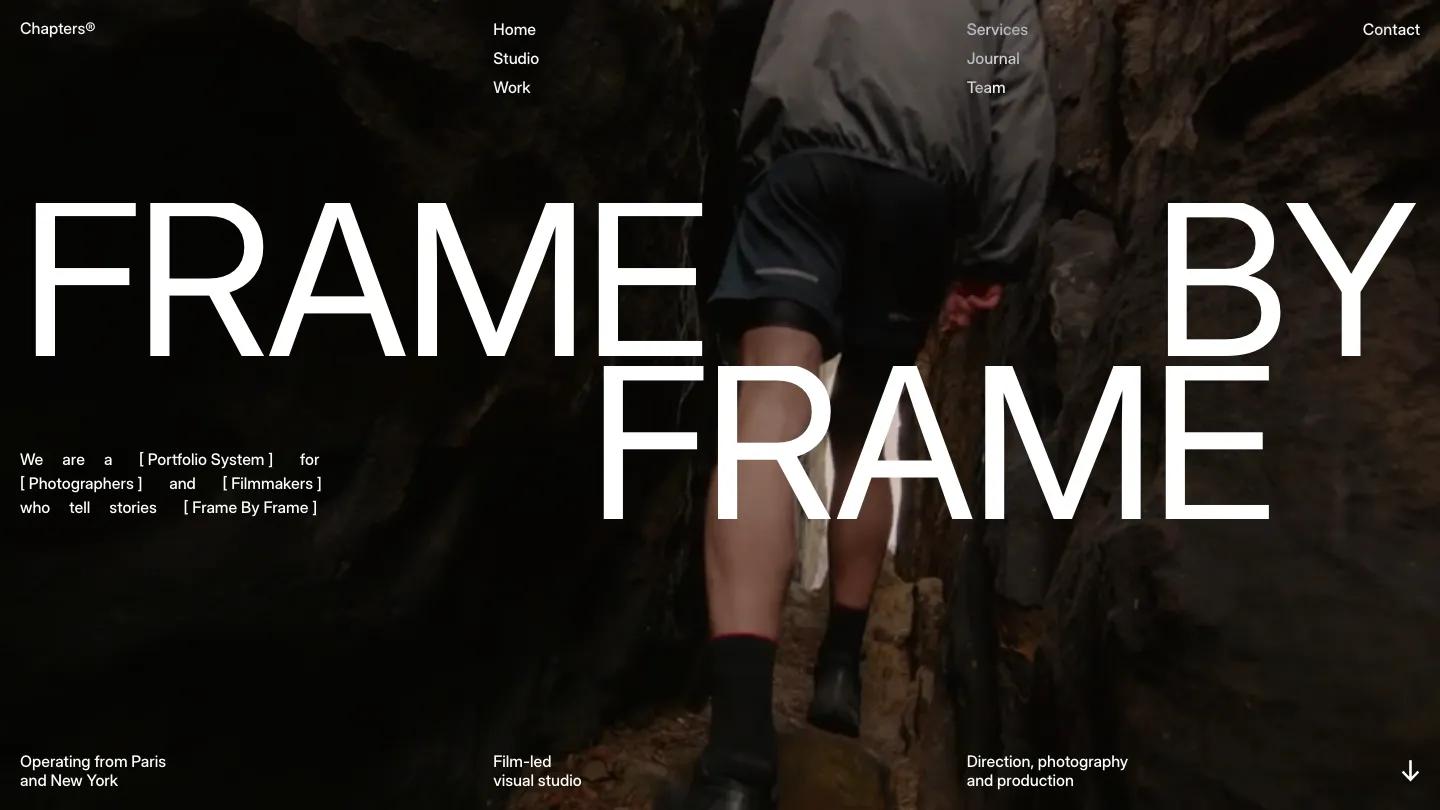
Chapters carries only two tags, Photography & Videography and Portfolio & Agency, which makes it one of the most focused templates in the category. A full-screen video hero with oversized white type opens the page, and bracketed labels give the copy an editorial rhythm.
It has the fullest page set here: studio, work, services, journal, team, careers and contact, with CMS collections for projects and posts. The services page pairs each offering with a full-width background image.
Worth knowing: at $129 it ties with Captured as the priciest pick on this list, and its spacious layout looks empty without finished footage.
Argentique
Design: 9.4/10
Dev: 9.1/10
Price: Free
Best for: portrait, event and travel photographers who want a free site with category filters and a services list
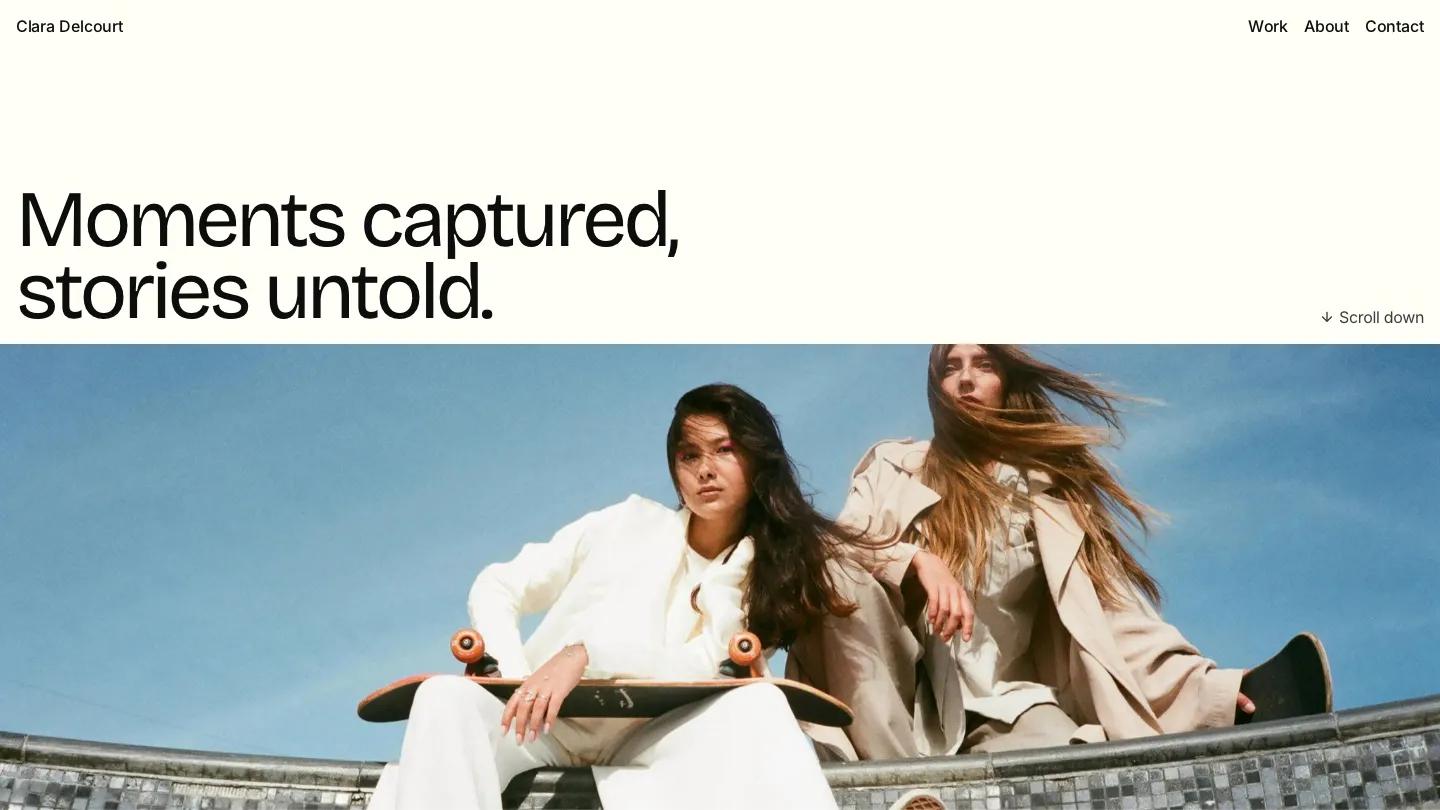
Argentique is the most traditional photographer's site on this list, and that's its strength. A single full-viewport photo opens the page on warm off-white, the type is a slightly quirky grotesque, and the work page filters by portrait, editorial, fashion and architecture.
A services section lists four session types with short explanations, and the contact page has a simple three-field form. Projects run through the CMS.
Worth knowing: its Dev: 9.1/10 sits below its Design: 9.4/10, and changing the type pairing means working in Framer's font settings.
Erza Vion
Design: 9.3/10
Dev: 9.2/10
Price: $49
Best for: photographers who want a stark, type-led Webflow portfolio with an awards section and few pages to maintain
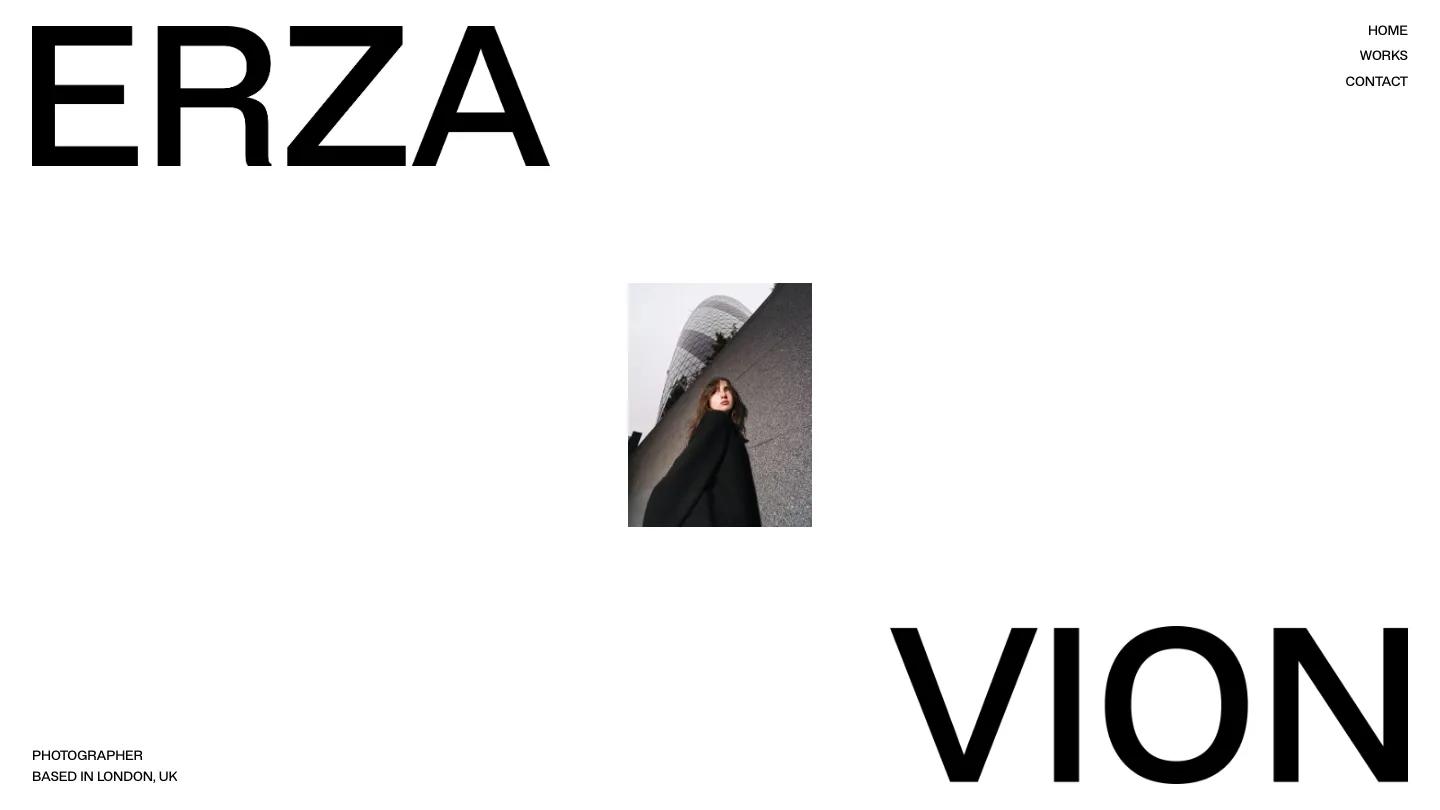
Erza Vion is the only Webflow template on this list, and also the barest. The demo splits the name across the homepage in huge black grotesque capitals, ERZA top left and VION bottom right, with one small portrait centered between them on white and a "Photographer, based in London, UK" line in the corner. Three uppercase links make up the navigation.
We haven't published a written review of Erza Vion yet, so this entry sticks to its scores and listed features. The homepage holds an about section, featured works, an awards list and a closing contact block, works run through a CMS collection with their own detail pages and galleries, and the build uses Client-First class naming, which keeps the Webflow structure readable for whoever edits it next.
Worth knowing: the contact page offers email and Instagram links rather than a form, and there's no services page, so it suits a portfolio more than a booking site.
Phrame
Design: 9.3/10
Dev: 9.2/10
Price: $29
Best for: editorial and fashion photographers with high-resolution work who want a black, white and cream magazine layout
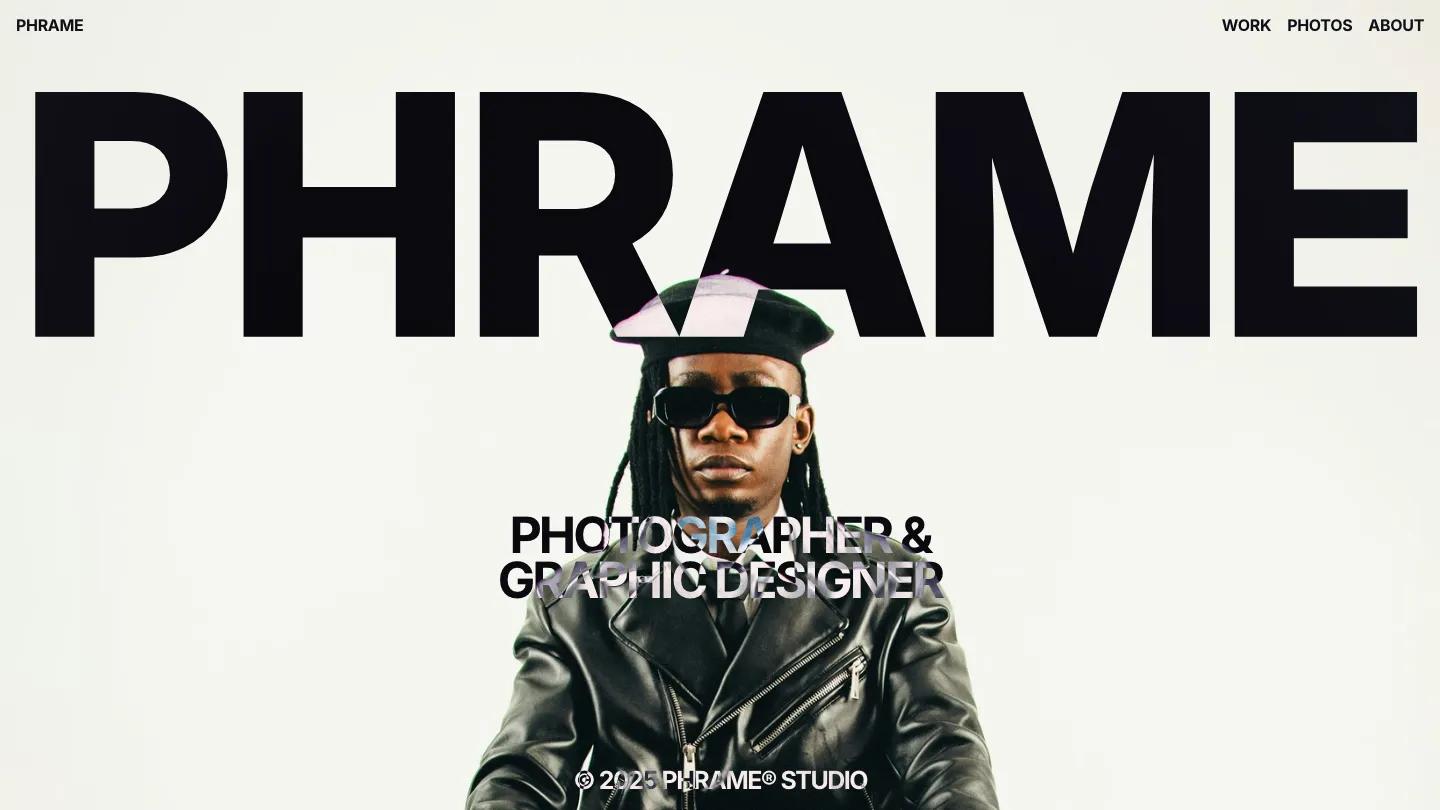
At $29, Phrame is the cheapest paid template on this list. It opens with the site name in enormous black letters on beige, then drops into a full-screen portrait with a subtitle in outlined type. Each project preview fills the screen with one large image, a title in the corner and category tags, so scrolling feels closer to flipping a magazine than browsing a grid.
The work page switches between grid and list views, and there's a separate photos page and an about page. Projects run through the CMS, and on a phone the oversized type scales down but stays bold while the portrait keeps its full-screen crop.
Worth knowing: project pages are built around big images with little room for captions, so check them first if your work needs written context.
Sonance
Design: 8.9/10
Dev: 9.4/10
Price: $79
Best for: photographers and directors with atmospheric, film-like work who want awards, process and pricing on one long homepage
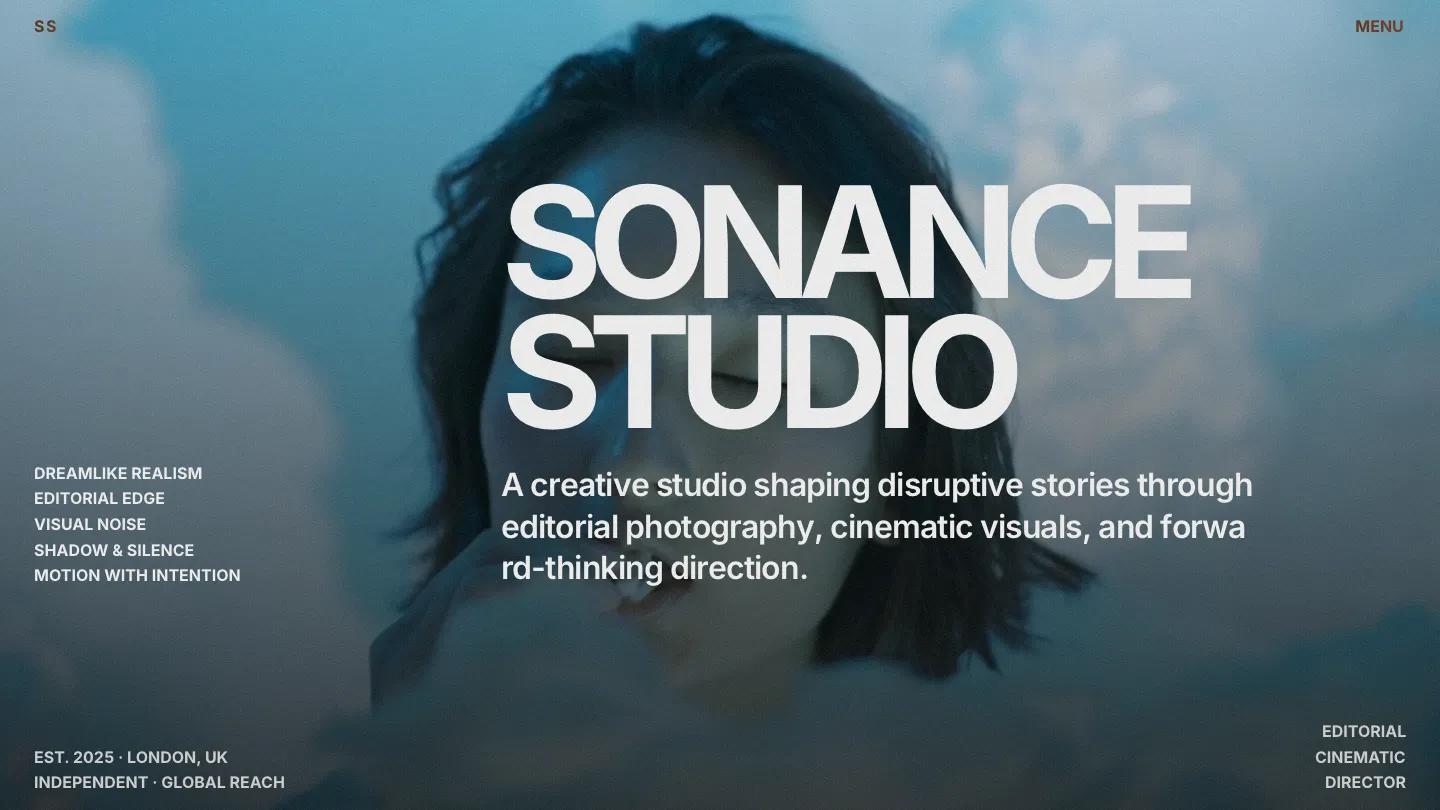
Sonance feels like the opening titles of an art house film. Muted, grainy teal footage plays behind a short statement, a stack of small uppercase tags and "Studio Sonance" in huge block letters along the bottom. Further down, an animated wireframe grid ripples across black before projects arrive as full-bleed images with techniques and short production notes set right on the photo.
The homepage also carries an awards and press table, three process cards, a pricing block and an archive of smaller shoots with their own pages. A services page, a contact form and a custom cursor are included, and the grainy hero holds up on a phone, with the studio name stacked at the bottom.
Worth knowing: the demo's awards table lists major industry prizes as placeholders, so replace it with your real recognition or remove it before launch.
Lou
Design: 9.4/10
Dev: 8.9/10
Price: Free
Best for: fashion and editorial photographers with bold, color-saturated work who want a free Framer site with a blog
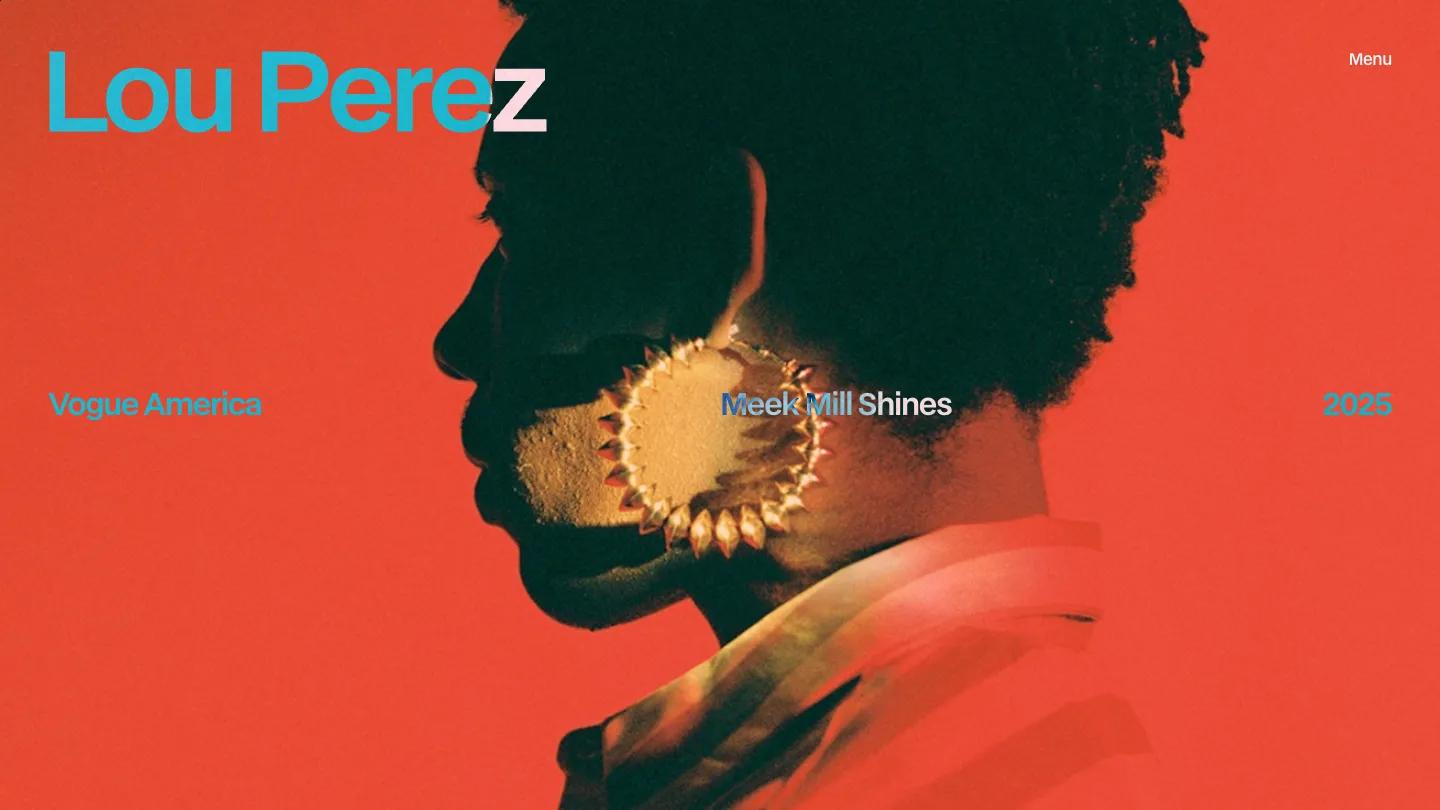
Lou puts one photograph at full bleed and sets everything else on top of it. In the demo, a profile portrait against flat red fills the screen, the photographer's name runs across the top left in large cyan sans, and a single line across the middle gives the publication, the story title and the year, like a magazine credit. A small Menu label is the only navigation.
We haven't published a written review of Lou yet, so this entry sticks to its scores and listed features: CMS-driven projects, a blog, about and contact pages with a form, and a custom cursor. Its Design: 9.4/10 matches most of the picks ranked above it.
Worth knowing: its Dev: 8.9/10 is the lowest on this list, and colored type over full-bleed photos needs a contrast check against every hero image you use.
Hanssen
Design: 9.3/10
Dev: 9.0/10
Price: Free
Best for: portrait and fashion photographers who want a free split-screen site that keeps a photo on screen at all times
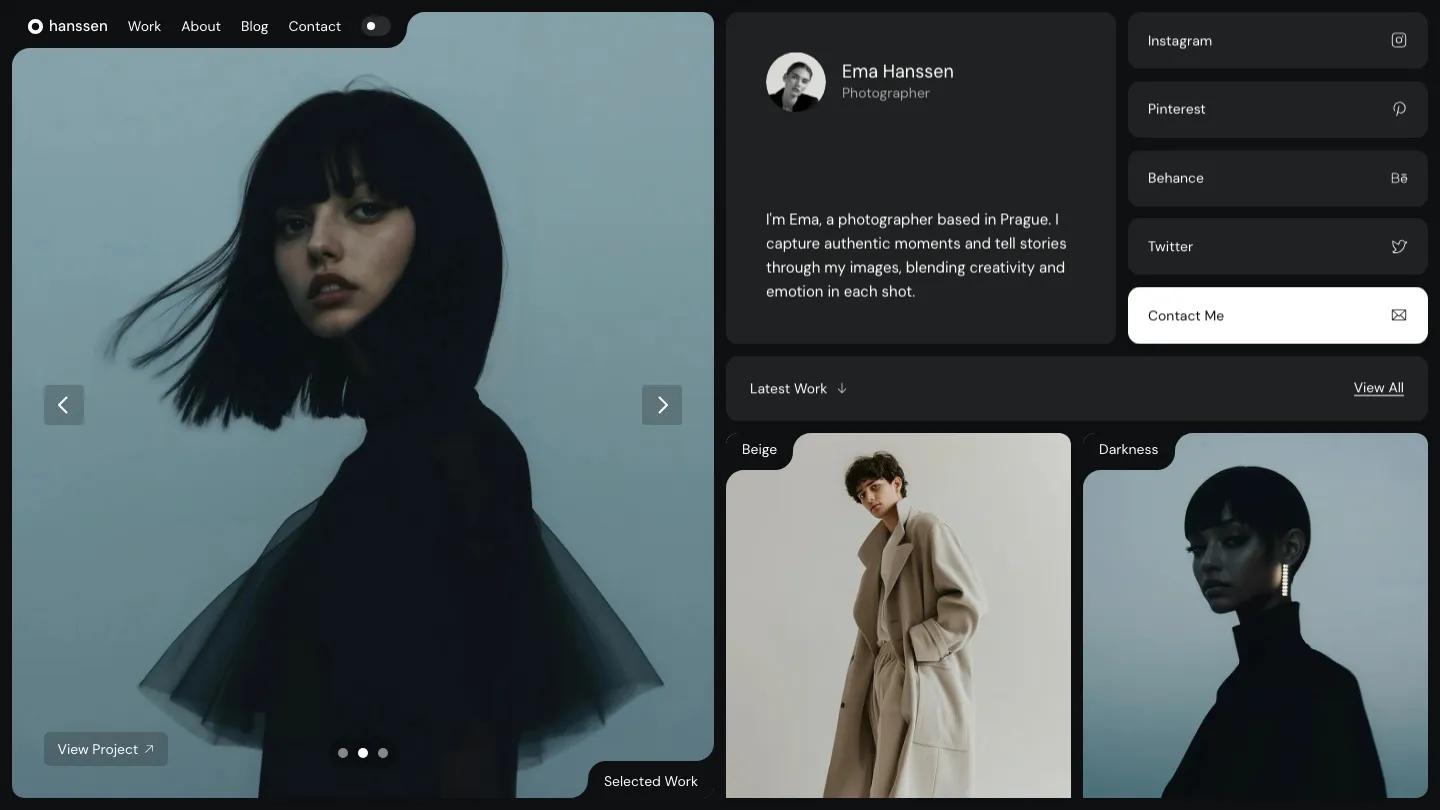
Hanssen splits the screen in two. The left half is a large image slider that stays put while you scroll, with arrows, dots and a View Project link, and the right half scrolls through soft grey cards: a profile with a round portrait and short bio, social link tiles and a solid black Contact Me tile. A notched-tab detail repeats across the layout and ties the pieces together.
A toggle in the navigation switches the whole site between light and dark, and the dark version makes fashion and portrait work look richer. The Work page lists every project as a row with its category and year, and about, blog and contact pages come with it. On a phone, the slider moves to the top and the cards stack underneath.
Worth knowing: the project grid crops everything into tall portrait frames, so wide horizontal shots lose a lot.
Captured
Design: 8.9/10
Dev: 9.3/10
Price: $129
Best for: portrait, wedding and family photographers who want bookings more than a pure gallery
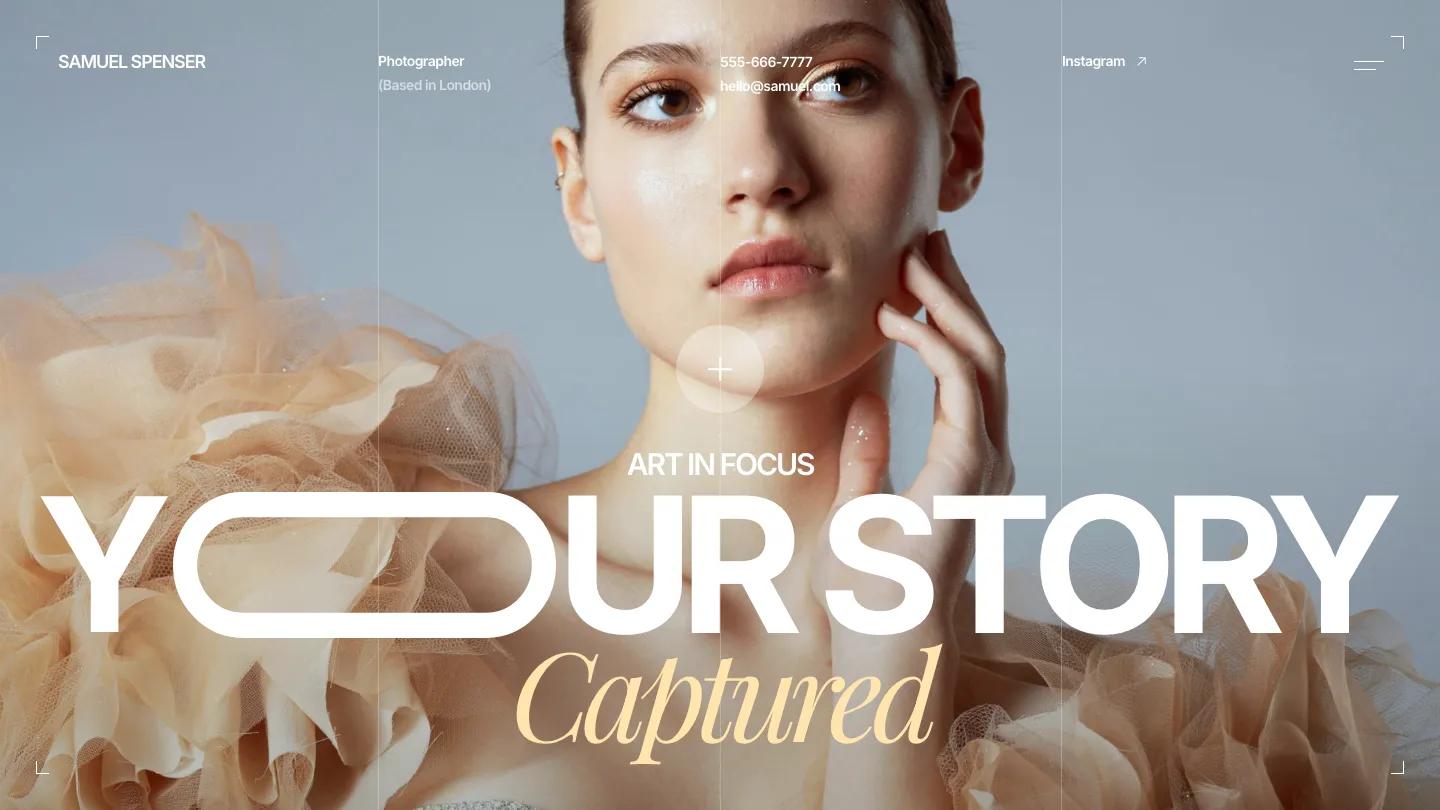
Captured reads like a studio brochure rather than a gallery. The hero layers a soft-lit portrait under "Art in Focus", a heavy white "Your Story" and a cream italic serif, framed by thin lines and corner brackets like a viewfinder, and the header carries the photographer's location, phone, email and Instagram.
The homepage then works through a services band with Professional Headshots, Weddings and Family Sessions, a bento grid with a turnaround time card, portfolio cards, a large testimonial, an FAQ and a blog. The Portfolio page adds a search field and a category dropdown above the grid, which helps once you have dozens of sessions online.
Worth knowing: the layered hero only works with a portrait that leaves room for type, and the stats card and contact details need your real numbers.
Granada
Design: 9.2/10
Dev: 9.0/10
Price: $99
Best for: production companies and cinematographers with strong footage who are happy to let video carry the homepage
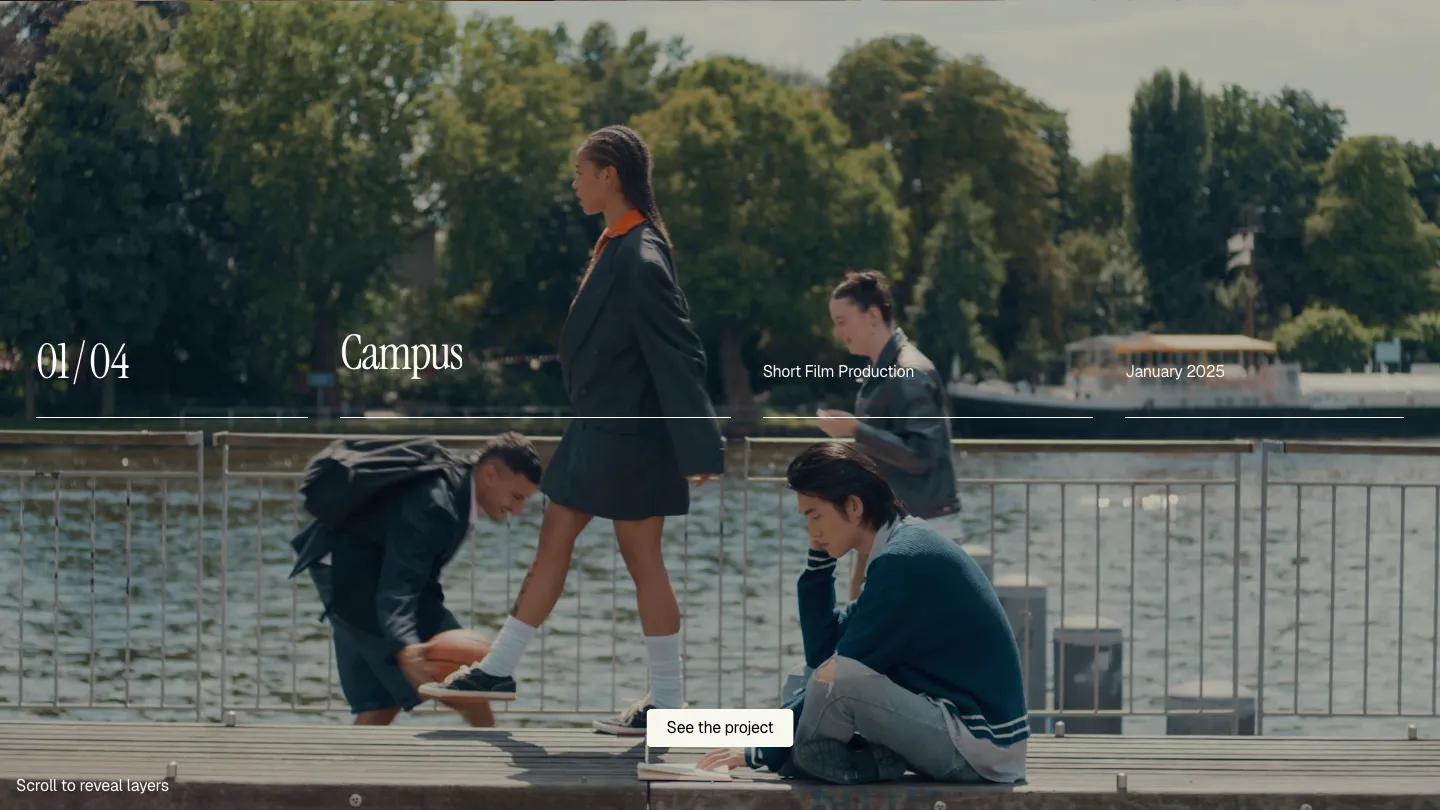
Granada behaves more like a showreel than a website. The homepage is a full-screen stage of autoplaying footage, with a thin row of ruled columns holding a project counter, the title in a condensed serif, the discipline and the release month. Scrolling wipes the next project's video up over the last, so each case study arrives as its own layer.
The header keeps About, Services, Work and Contact spaced across the top, the About page pairs a full-bleed photo with three serif statements, and projects run through the CMS. On a phone, the footage crops tight and the counter, title, discipline and date fold into a two-column grid.
Worth knowing: there's no visible project list on arrival, so check that the scroll-to-reveal effect makes sense to first-time visitors.
Free Photography Website Templates
78 of the 235 photography templates in our library are free, 70 of them on Framer. Free photography templates average 8.1/10 overall against 8.5/10 for paid, and 11 free ones score 8.5/10 or above. Four are on this list: OXR for video work, Argentique for a classic photographer's site with filters, Lou for bold, color-saturated editorial work, and Hanssen for a split-screen portfolio with a light and dark toggle.
Two more free Framer templates are worth a look: Focura (Design: 8.8/10, Dev: 8.6/10), a warm, serif-led portfolio with service cards for portrait sessions and event photography, and MUSE STUDIO (Design: 8.4/10, Dev: 8.7/10) for portrait and wedding studios, with a black and white frame that leaves the color to the photos. On Webflow, free photography templates are scarce: 8 of the 92 are free, and none made this list. All of them are on our free templates page.
How We Scored These
Several designers and developers, each with 10 or more years of experience, scored every template here independently. Designers set the Design Score, developers set the Dev Score, and the published numbers are their averages. Templates below 7.0 overall are not published, and creator reputation, sales and marketplace ratings play no part. The full process is on our methodology page.
Several higher scoring templates with the photography tag, including MOSS and Inception 3D on Webflow, are general portfolios or agency sites rather than photography sites, so we left them off this list. The same goes for Shopify: the seven themes with the photography tag are stores for fashion, goods or art prints, not portfolios. If Framer is your platform, our 20 best Framer portfolio templates covers more options. On our listing pages, every template card plays a looping screen recording of its homepage, so you can compare galleries without opening a single demo.
FAQ
13 Best Portfolio Website Templates for Webflow and Framer (2026)
by Marcus Jones
9 Best Real Estate Website Templates for Webflow and Framer (2026)
by Thomas Martinez
12 Best Personal Website Templates for Webflow and Framer (2026)
by Thomas Martinez
10 Best Restaurant Website Templates for Webflow (2026)
by Marcus Jones
12 Best Interior Design Website Templates for Webflow, Framer and Shopify (2026)
by Marcus Jones