Webflow vs Framer vs Shopify: Which Platform Should You Build On?

Webflow, Framer, and Shopify each excel at different things. This comparison breaks down what each platform actually does well, where it falls short, and which one fits your project, so you can choose based on your needs, not guesswork.
You're trying to choose a platform to build your website or app. You've probably heard of Webflow. You've heard of Framer. Maybe someone told you Shopify was the answer. The problem is that all three are good at different things, and generic comparisons online either gloss over the real differences or sound like they were written by someone with a commercial interest in pushing one option.
Why This Comparison Matters
The stakes are real here. Pick the wrong platform and you'll spend weeks or months fighting against limitations that a different platform would have solved in days. You might end up redesigning your entire architecture halfway through. You might hit a wall trying to do something that another platform handles natively. And if you're building for a client or a business, the wrong choice compounds the cost in developer time, hosting fees, and lost time to market.
What you actually need is a breakdown of what each platform genuinely does well, where each one breaks down, and which one is the right fit for what you're trying to build. That's what this post does. We'll walk through Webflow, Framer, and Shopify directly, their strengths, their real limitations, and the specific types of projects each one serves best. By the end, you'll have a decision framework that points you toward the right choice based on your actual needs, not hype or convenience.
This isn't a listicle ranking platforms arbitrarily. It's a clear-eyed look at three fundamentally different tools that happen to overlap in the "build a website" category but serve distinct use cases. We've worked with all three. We know where each one shines and where each one creates problems. That's what this comparison gives you.
Webflow: The Full-Stack Designer's Platform
Webflow gives you full visual control over HTML, CSS, and JavaScript structure without writing code. The canvas acts as a direct interface to the underlying box model, when you adjust flexbox properties or set responsive breakpoints, you're configuring actual CSS properties, not abstract design tokens. This makes it powerful for designers who understand web fundamentals but don't want to hand-code everything.
The CMS is genuinely flexible. You define custom content types with whatever fields you need, reference collections within other collections, and filter or sort dynamically on the page. This works well for blogs, case studies, team directories, or any structured content that needs to scale. The hosting includes a CDN and automatic image optimization, so performance is solid out of the box.
Where Webflow struggles: the learning curve is steep if you don't already understand how CSS layouts work. The interface assumes you know what flexbox alignment, position properties, and z-index do. If you're coming from a pure graphic design background with no web experience, expect a few weeks of frustration before the logic clicks. Once it does, you move fast. But the onboarding is real.
Hosting costs add up quickly. The cheapest plan that removes Webflow branding and allows custom domains is $14/month for a basic site, but anything with CMS content or higher traffic pushes you into the $23-$39/month range. If you're building multiple client sites, that's a recurring cost per project that Framer avoids entirely.
Webflow becomes overkill for simple portfolio sites or landing pages that don't need dynamic content or complex interactions. It's also not built for e-commerce at scale, the native Webflow e-commerce feature exists, but it's limited compared to dedicated platforms like Shopify. If you're building an online store with more than 50 products or need advanced inventory management, Shopify handles that infrastructure better.
Webflow is the right choice when: you need full design control with CMS flexibility, you're comfortable learning a technical interface, and you're building content-heavy sites, marketing sites for serious brands, or portfolio and agency templates where custom layouts matter more than speed to launch. It's a professional tool for designers who treat web design as a craft, not a shortcut.
Framer: The Rapid Prototyping and React-Powered Alternative
Framer started as a prototyping tool for designers who wanted to create high-fidelity interactive mockups. It has since evolved into a full website builder, but its DNA is still rooted in animation, interaction, and component-based thinking. If you need a site with fluid motion, scroll-based animations, or interactive UI elements that feel like a product interface, Framer handles that better than Webflow or Shopify. It's built on React, which means everything you create is a component by default, reusable, instance-based, and easy to propagate changes across pages.
The visual editor feels closer to Figma than to traditional website builders. You work in frames, you define variants, you wire up interactions without touching JavaScript. Designers who want animation-heavy work without writing code find Framer's workflow natural. The learning curve is shorter than Webflow's if you're coming from a product design background, a trade-off we cover in detail in our Framer vs Webflow comparison. You can prototype interactions in the morning and publish a live site by afternoon.
Where Framer struggles is anywhere you need backend complexity. E-commerce is limited, you can integrate Shopify Buy buttons or third-party cart systems, but there's no native store builder. Content management is basic compared to Webflow's CMS. If you need blog pagination, filtering, or relational content structures, you'll hit the ceiling fast. Server-side rendering, complex databases, authentication flows, none of that is Framer's strength. It's a front-end tool first.
Framer works best for landing pages, product showcase sites, portfolio sites where motion matters, and early-stage startup sites that need to look polished quickly. If your site is content-light, interaction-heavy, and doesn't need a shopping cart or a CMS with depth, Framer delivers faster than the alternatives. If you need free templates to start from, the ecosystem is smaller but the quality is consistently high, most Framer templates are built by designers who understand component systems.
Shopify: The E-Commerce Specialist

Shopify is not a website builder that happens to support e-commerce. It is an e-commerce platform that happens to let you build pages around the store. That distinction matters. If you are building a store , anything where the core function is selling physical or digital products online , Shopify is the strongest option of the three by a significant margin.
What makes it the right choice: Shopify handles payment processing natively through Shopify Payments, which means fewer integration headaches and lower transaction fees if you use their system. It manages inventory tracking, order fulfillment, shipping calculations, and tax compliance across multiple jurisdictions without requiring third-party plugins. The checkout experience is optimized and battle-tested at scale. The app ecosystem is massive, if you need abandoned cart recovery, subscription billing, advanced product filtering, or wholesale pricing tiers, there's an app for it that integrates cleanly.
The platform is built for people who need to run a store, not for people who need flexible design control. The theme system is rigid compared to Webflow or Framer. Customizing layouts outside of what the theme supports means editing Liquid templates, which is its own learning curve. If your project is a marketing site with a small shop attached, Shopify feels like overkill and limitation at the same time.
When Shopify is the only real choice: you're launching a product-based business, you're selling at volume, you need multi-currency support, or you're managing complex inventory across multiple SKUs. If the store is the business, use Shopify. If the store is a side feature, look elsewhere. And if Shopify is the pick, start with where to buy Shopify themes before committing to a $360 median purchase that is final sale.
Side-by-Side Feature Comparison
| Criteria | Webflow | Framer | Shopify |
|---|---|---|---|
| Design Flexibility | Full visual control over layout, spacing, typography, and interactions without writing code. Grid and flexbox systems work exactly as CSS does. | Component-based design with constraints that keep layouts consistent. Design freedom is high but structured around React paradigms. | Template-bound unless you write Liquid code. Customization lives inside theme settings or requires developer work. |
| CMS Capabilities | Native CMS with custom collection types, relational fields, and conditional visibility. Strong for marketing sites and content-driven projects. | Built-in CMS that integrates directly with components. Simpler than Webflow's but clean for blogs, case studies, and portfolio content. | Built for product catalogs. The CMS structure revolves entirely around inventory, orders, and customer data. |
| E-commerce Functionality | Basic e-commerce works for small catalogs but lacks inventory management, shipping logic, and multi-currency handling at scale. | E-commerce exists but it's minimal. You'll need to integrate Shopify or another provider for anything beyond a few products. | This is what Shopify was built for. Abandoned cart recovery, multi-channel selling, POS integration, tax automation, discount logic, all native. |
| Hosting Costs | Starts at $14/month for basic sites. CMS adds cost. E-commerce plans start at $29/month. Bandwidth and traffic included. | Starts at $5/month for personal sites. Scales to $15-$25/month for most professional use. Clean pricing, no surprise fees. | Starts at $39/month for Basic. Advanced plans go to $399/month. Transaction fees apply unless you use Shopify Payments. |
| Learning Curve | Steep if you've never touched CSS concepts. Box model, positioning, and responsive breakpoints take time to internalize. | Easier than Webflow if you understand components. Interaction design is more intuitive. Steeper if you need custom code. | Easy for store setup. Hard if you need to customize beyond theme options. Liquid templating requires developer knowledge. |
| SEO Tooling | Full meta control, custom slugs, alt text, schema markup support, and clean semantic HTML output. Strong foundation. | Meta fields and alt text are straightforward. Schema requires custom code. HTML structure is clean but less granular than Webflow. | SEO features are solid for product pages. Blogging tools exist but feel secondary. URL structure is rigid. |
| Template Availability | Large marketplace with quality variance. Strong commercial template ecosystem. Plenty of free options but quality matters. | Smaller marketplace but rising fast. Higher average quality in paid templates. Fewer free options worth using. | Massive theme store. Quality varies wildly. Enterprise-grade themes exist but cost $300-$400. Free themes are functional but generic. |
| Code Control | Full HTML/CSS export on paid plans. Custom code embeds work well. JavaScript integrations are straightforward. | React-based. You can write custom components but you're working inside Framer's structure. No full export. | Liquid access on all plans. Full theme code control. You can rebuild everything if you have developer resources. |
| Performance | Fast if built carefully. Bloat happens when interactions and CMS logic stack up. Hosting is managed and reliable. | Extremely fast. Framer's infrastructure prioritizes speed. Lazy loading and optimization happen automatically. | Speed depends on theme quality and app usage. Too many apps slow everything down. Shopify's CDN is solid. |
| Support Ecosystem | Webflow University is thorough. Community forums are active. Plenty of agencies and freelancers available. | Smaller community but growing fast. Documentation is clear. Fewer expert resources available for hire compared to Webflow. | Huge support network. Shopify experts are everywhere. App ecosystem solves almost any edge case but adds cost and complexity. |
How to Choose: A Decision Framework
Stop asking "which platform is best" and start asking three questions about your specific project. The answers will point you toward the right choice faster than any feature checklist.
What is the core function of your site?
If you're selling physical products at volume, Shopify wins immediately. Its checkout flow, inventory management, shipping integrations, and payment processing infrastructure are built for commerce and tested at scale. Webflow has e-commerce, but it caps at 15,000 SKUs and the checkout experience feels like an add-on rather than the foundation. Framer has no native e-commerce at all, you'd need to integrate a third-party solution, which adds complexity and breaks the unified design system.
If you're building a marketing site, product landing page, or agency portfolio, Framer and Webflow are both strong contenders. Webflow's CMS and layout controls give you more power for complex content structures. Framer's component system and animations make prototyping and interaction design faster and more intuitive.
If you're building a SaaS product or app interface with real user authentication, dynamic data, and custom backend logic, none of these platforms are the right tool. You need a proper frontend framework or no-code app builder designed for application development, not website publishing.
Who will manage the content after launch?
If non-technical team members need to publish blog posts, update case studies, or manage product listings regularly, you need a strong CMS. Webflow's CMS is the most flexible and editor-friendly of the three. Shopify's product management interface is excellent for commerce but limited for custom content types. Framer's CMS is simpler and works well for straightforward blog structures, but it doesn't handle complex relational data or multi-step publishing workflows.
How much design customization do you need?
If you want pixel-perfect control over every layout detail and complex responsive behaviour, Webflow gives you the most precision. If you want to prototype interactions quickly and ship a polished result without writing code, Framer's component-based workflow is faster. If you're working within Shopify's ecosystem, expect to fight the platform's structure unless you're comfortable writing Liquid templates and custom CSS.
Nuanced scenarios where one platform is clearly better:
A SaaS company needs a marketing site with a blog, detailed product pages, and a separate docs site with search. Webflow. Its CMS can handle all three content types cleanly, and you can build custom search functionality with third-party integrations or Webflow's native tools.
A fashion brand selling 200 products needs a clean storefront, seasonal collections, and the ability to run flash sales. Shopify. Nothing else comes close for this use case.
A design agency wants to showcase work with smooth page transitions, interactive case study presentations, and easy client handoff. Framer. The prototyping-to-production workflow is the fastest path here, and clients can edit content without breaking the design.
A Note on Template Quality and How We Evaluate
Before we get into the platform comparison itself, understand that when we recommend templates in this post, they've been through our evaluation process. We don't feature everything we see. We score every template we review on two dimensions. Multiple team members assess each template independently and the published scores are their averaged result: Design (how well the visual execution works, how intentional the layout and type hierarchy are, whether the aesthetic holds up beyond the hero section) and Development (code quality, CMS structure, whether the build is maintainable, how well it handles edge cases).
A template needs to clear our threshold on both scores to make it into our library. When we link to a Webflow template, a Framer template, or a Shopify theme later in this guide, you're looking at something we've actually examined. Not just something that ranked in a marketplace algorithm or had good preview screenshots.
This matters because choosing the right platform is only half the decision. The template you build from, or the design system you reference, determines whether you start clean or inherit problems. A poorly structured Webflow site is harder to maintain than a well-built one. A Framer template with a messy component library costs you time every time you need to make a change. A Shopify theme with bad performance bakes slowness into your store from day one.
So when we point you toward specific starting points, we're doing it with the same criteria we'd use for our own projects.
What Comes Next
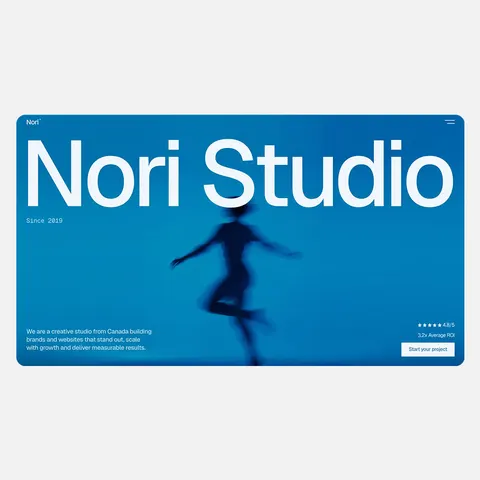
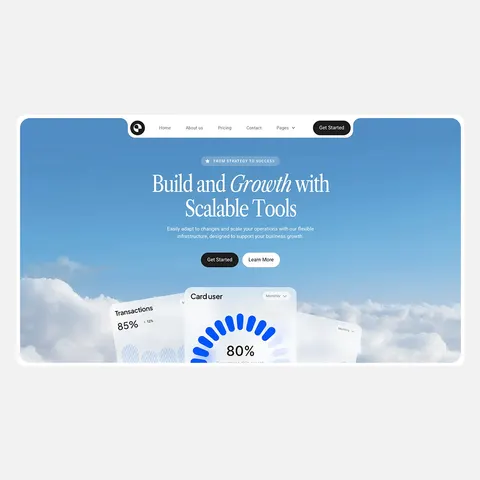
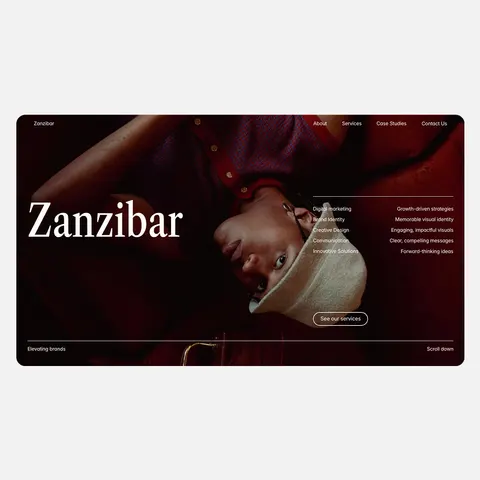
Now that you know what each platform handles best, go look at real examples. Browse template libraries for the platform that matches your use case. If you're building a marketing site or portfolio, start with our 30 best Webflow templates and 30 best Framer templates roundups to see what's possible out of the box, or compare where Framer templates are sold if that's your platform. If you're launching a store, filter Shopify themes by your niche and check how they handle product detail pages and checkout flow.
Pay attention to how each platform's templates handle the specific features you need. Check CMS structure if content matters. Check animation controls if interaction design is part of your brief. Check theme customization depth if you're working in Shopify.
If you're still on the fence between two platforms, pick one and prototype a single page. Build the homepage or product detail page that matters most to your project. You'll know within a few hours whether the platform fights you or supports the work.
Our template library covers all three platforms with honest scoring on design quality and development structure. Filter by what you're building and start there.
Final Thoughts
The choice between Webflow, Framer, and Shopify comes down to matching what each platform does best to what your project actually needs. If you're selling products, Shopify removes the guesswork, its infrastructure is built for commerce and the alternatives require you to bolt on solutions. If you need marketing muscle with flexible design and CMS depth, Webflow gives you that control at the cost of a steeper learning curve and monthly hosting fees. If you need to move fast with animation and interaction as core design elements, Framer gets you there quicker and cheaper, but only if your site doesn't need a complex backend or e-commerce layer.
Your next step is honest about your actual requirements. How many products do you need to sell? How much custom interaction does the design call for? How much content management complexity are you adding? How much time can you spend learning the platform versus needing results immediately? Answer those clearly and the platform choice becomes obvious. The wrong choice costs months of friction. The right choice gets out of your way and lets you focus on building something that works.
Framer vs Webflow: What 725 Scored Templates Tell Us About Each Platform
by Thomas Martinez
13 Best Photography Website Templates for Webflow and Framer (2026)
by Marcus Jones
13 Best Portfolio Website Templates for Webflow and Framer (2026)
by Marcus Jones

9 Best Real Estate Website Templates for Webflow and Framer (2026)
by Thomas Martinez
12 Best Personal Website Templates for Webflow and Framer (2026)
by Thomas Martinez