Safari Adaptive Dark Mode Explained: What It Does to Your Website

Safari 27.3 adds Adaptive Dark Mode, which repaints light websites in dark colors for anyone using dark mode. Here is how it works, which sites it skips, what it does to logos and images, our test of 945 live website templates, and what site owners can do now.
Last updated: November 4, 2026
You picked your website's colors with care. A cream background for your recipe blog, a crisp white page for your portfolio, a soft pink for your shop. Until now, every visitor saw those colors, even people who keep their phone or laptop in dark mode at night.
That is about to change for Safari users. On November 3, 2026, Apple's WebKit team announced Adaptive Dark Mode, a Safari feature that repaints light websites in dark colors when the visitor uses dark mode. This page explains what it does, which sites it leaves alone, what happens to your logo and photos, how many sites it could touch (we tested every live template in our library), and what you can do about it today.
Key Facts
- Adaptive Dark Mode arrives in the Safari 27.3 beta and turns light websites dark for people who use dark mode. WebKit
- Almost 40% of web page loads come from people in dark mode, but only 10% of page loads support it, according to WebKit, citing Chrome usage data. WebKit
- Sites that already declare their own dark mode, and pages that are already dark, are left unchanged. WebKit
- Most photos are left alone, but simple black and white logos and SVG graphics can be recolored. WebKit
- Of 945 live website templates we tested, 62% stay light with no dark version in dark mode, so Safari would offer to repaint them; only 3% have their own dark mode. (BestWebsiteTemplate.com study, November 2026)
- Websites can't detect when Safari has applied it, so you can't measure it in your analytics. WebKit
What Is Safari Adaptive Dark Mode?
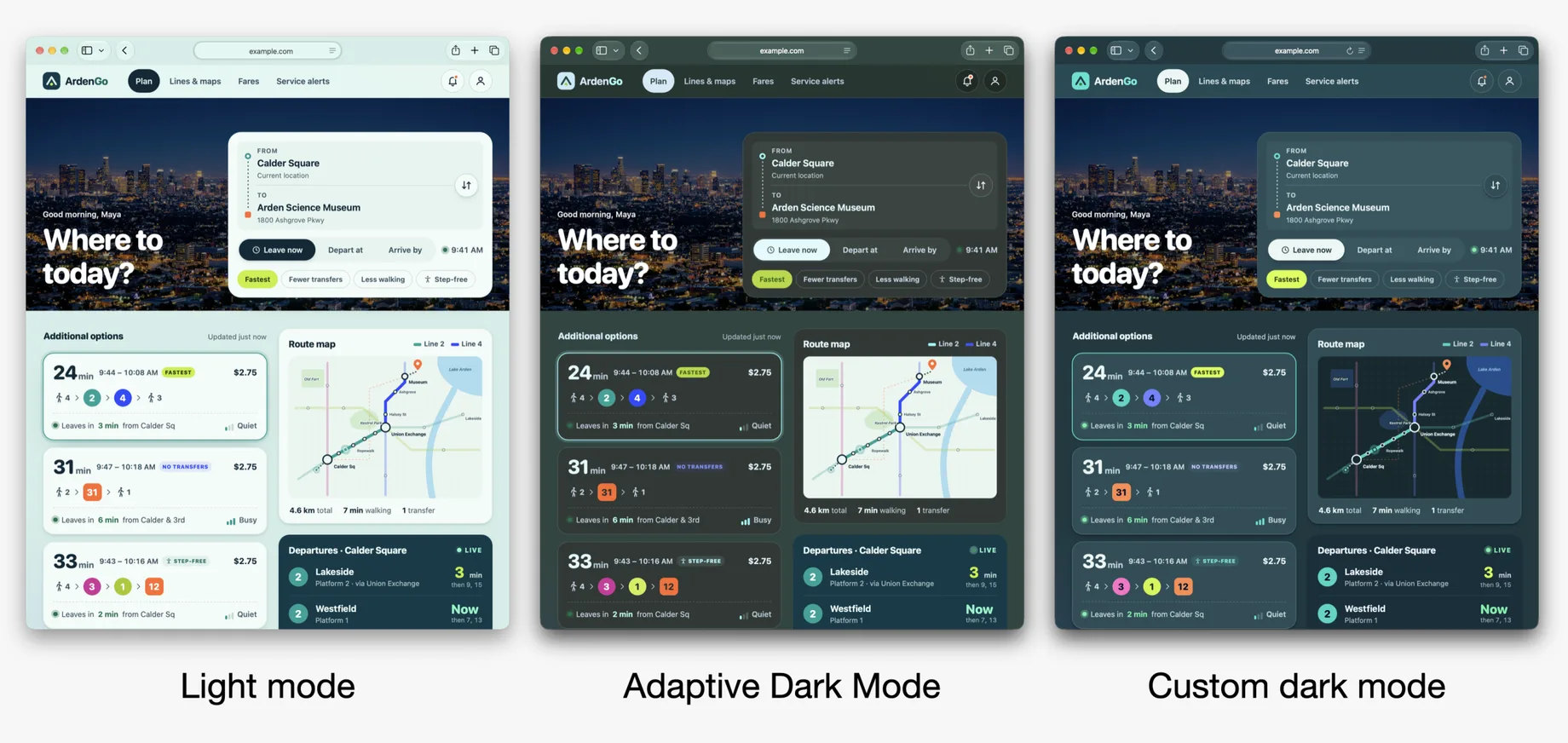
Adaptive Dark Mode is a new Safari setting that shows light websites in dark colors when your device is set to dark mode. It works on sites that never built a dark version: Safari analyzes the page and swaps light backgrounds for dark ones and dark text for light text. It is in the 27.3 betas for iPhone, iPad and Mac.
Safari was the first browser to support dark mode on the web, in Safari 12.1 in 2019 WebKit 2019. That support only worked when a site's designer built a dark version on purpose, and most never did. WebKit's announcement says the new feature is "designed to close that gap" between the many people who prefer dark screens and the few sites that offer one.
To try it, a person sets their device to dark mode and opens a site with a bright background. Safari offers a preview of the dark version with a Try button WebKit. Beta coverage reports that it can then be applied to all sites or managed site by site iClarified tbreak.
How Does Adaptive Dark Mode Work?
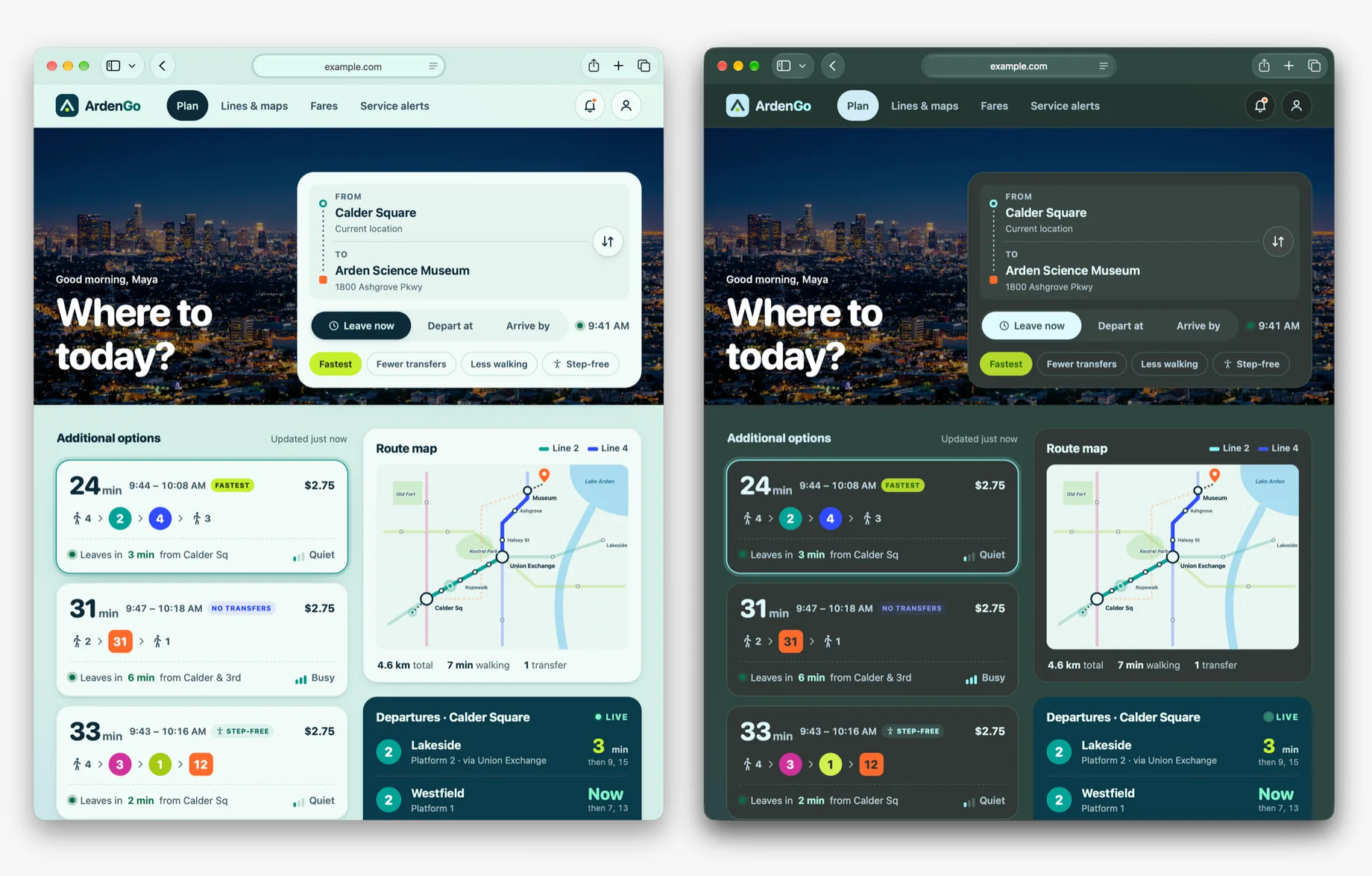
Safari first checks whether a page is mostly light or mostly dark. If it is light, Safari runs its colors through a filter that flips brightness but keeps each color's hue, so a pale blue background becomes a deep blue rather than an orange one. It then adjusts text to meet a 4.5 to 1 contrast ratio, the common accessibility standard for readable text.
WebKit describes a set of judgment calls on top of that basic flip WebKit:
- Buttons should still stand out from the background around them.
- Text placed over images should stay readable.
- Pop-up menus should stay clear.
- Light color gradients are converted too.
- Some visual effects, such as masks and blend modes, may be switched off on the parts it changes.
The result is not a simple "invert colors" filter, which would turn photos into negatives. It is closer to an automatic dark theme, built on the fly for each page.
Which Websites Will Safari Change?
Safari only changes pages that look light and haven't told the browser they support dark mode. A site that declares its own light and dark versions is left completely alone, in WebKit's words, "Adaptive Dark Mode does not change a thing." A page that already has a dark background with light text is also left as it is.
That gives three groups of sites:
| Your site today | What Safari does |
|---|---|
| Has its own dark mode | Nothing; your dark version shows |
| Already uses a dark design | Nothing |
| Light design, no dark mode | Offers to repaint it dark |
| Light design, opted out | Nothing (opt out not working in beta 1) |
Source: WebKit
What Happens to Logos, Photos and Brand Colors?
Most images stay exactly as you uploaded them. The exceptions are logos and graphics. Safari can recolor SVG graphics, and for ordinary image files it looks at the mix of pixels and inverts simple black and white logos, so a black logo doesn't vanish on a dark background. Drawing areas such as charts made in canvas are left unchanged WebKit.
Brand colors are where most owners will feel it. Because the filter keeps hue but flips brightness, a light brand color comes out as a darker shade of itself. In principle, a soft pink page should come out as a deep plum and a pale mint as a dark green. Your colors stay in the same family, but the exact shades you chose won't be the ones these visitors see.
The bigger risk is images with a light background baked in. A product photo on a white square, or a logo saved as a picture with a white box around it, will sit on the new dark page as a bright rectangle. WebKit's advice is to use transparent backgrounds for those images.
How Many Websites Could This Affect?
Most of them. WebKit's own figures say almost 40% of page loads come from people in dark mode while only 10% of page loads support it. Both numbers come from Chrome's public usage statistics, which WebKit links to but doesn't date. So for a large share of visits, the page someone sees is light even though they asked their device for dark.
Our Study: How Many Website Templates Already Have a Dark Mode?
Very few. On November 4, 2026, we opened the live demo of every template in our library that has one, 945 sites built on Framer, Webflow and Shopify, once with the computer set to light mode and once set to dark. Only 28 (3%) have their own dark mode. 589 (62%) stay light in dark mode with no dark version, which is exactly the kind of page Safari will offer to repaint.
| Platform | Tested | Own dark mode | Already dark | Light, no dark mode |
|---|---|---|---|---|
| Framer | 429 | 27 (6.3%) | 130 (30.3%) | 264 (61.5%) |
| Webflow | 340 | 0 (0%) | 122 (35.9%) | 209 (61.5%) |
| Shopify | 176 | 1 (0.6%) | 34 (19.3%) | 116 (65.9%) |
| All | 945 | 28 (3.0%) | 286 (30.3%) | 589 (62.3%) |
Source: BestWebsiteTemplate.com study of 945 live template demos, November 4, 2026. The remaining 42 sites (4.4%) mix light and dark areas on the first screen.
Three things stand out:
- Dark mode that follows your device is rare. 24 templates switch to a dark design on their own when the computer is set to dark, and 4 more tell the browser they support dark colors. All but one are on Framer. Not one Webflow demo we tested has it.
- Almost a third are dark already. 286 templates use a dark design in both modes. Safari leaves those alone.
- A theme switch is not the same thing. 59 templates in our library list a light and dark theme as a feature, but many of those let the site owner pick one look rather than following each visitor's device. For Safari, what counts is whether the live page responds to dark mode.
Method. We found each template's live demo from its marketplace page (946 of 1,004 live templates had one; one failed to load). We loaded each demo in a headless Chromium browser at 1,280 by 800 pixels, once with the system color preference set to light and once to dark, and waited 2.5 seconds for animations. We counted a template as having its own dark mode if the first screen got clearly darker in dark mode, or if the page declared dark mode support. We classed the rest as light or dark from the solid background colors at 15 points across the first screen. Limits: we looked only at the top of each homepage, and Safari's own analysis may judge a few borderline pages differently. Our scripts and raw data are kept with our research notes.
When Will Adaptive Dark Mode Be Available?
Right now it is only in the first developer beta of Safari 27.3, released on November 3, 2026, for iPhone, iPad and Mac iClarified. Apple hasn't announced a public release date. MacRumors expects the 27.3 updates to launch in December after several rounds of beta testing, as reported by tbreak; treat that as a forecast, not a confirmed date.
Features can change during a beta. WebKit's post says to "check back as Adaptive Dark Mode evolves through the beta process."
What Should Website Owners Do Now?
You have three choices: build your own dark mode, prepare your site so Safari's version looks good, or opt out and keep your site light. Most owners will want one of the first two: an opted-out bright page at midnight is exactly what these visitors asked their device to avoid.
1. Look at your site in dark mode. Once Safari 27.3 is out, set your phone to dark mode, open your site in Safari and tap Try. Check your logo, your buttons, product photos and any text over images.
2. Fix images with white boxes. Re-export logos and product shots with transparent backgrounds, and use vector logos (SVG files) where your site builder allows it. WebKit recommends both.
3. Prefer real colors over background pictures. Backgrounds made from tiled images or textures can't be recolored cleanly. Solid colors and gradients set in your site builder can.
4. Build your own dark mode if your brand depends on exact colors. A designed dark version always beats an automatic one, and Safari steps aside for any site that declares it. Some templates come with a light and dark theme built in: in our library, 59 of the 1,004 live templates carry a light and dark theme feature, most of them on Framer. If yours is one of them, switching it on may be all you need. Our guides to editing a Webflow template, a Framer template and a Shopify theme show where those settings live.
5. Opt out only if you must. A short "color scheme" setting that marks your page as "light only" tells Safari not to touch it. WebKit says the "only" part doesn't work yet in the first beta, so this may not take effect until a later build.
Is This the Same as Chrome's Auto Dark Mode?
They are similar ideas. Google has tested an automatic dark theme for light websites in Chrome on Android since Chrome 96, and it uses the same "light only" opt-out Chrome for Developers. Google still describes that feature as being specified. Safari's version adds its own rules for logos, images and text contrast, and it reaches iPhone, iPad and Mac users rather than Android phones.
What We Still Don't Know
- The public release date. Apple hasn't given one.
- Where the switch will live in Safari's settings, and whether it will be on by default.
- Whether it comes to Safari on Apple Vision Pro.
- How the "light only" opt-out will behave once it works.
Because sites can't detect when the feature is applied, there is also no way to count how many of your visitors will see the dark version. Scripts that read your page's colors get the original colors back, a choice WebKit made to protect privacy WebKit.
How to Cite
You are welcome to use our template study figures. Please credit BestWebsiteTemplate.com and link to this page.