Signal Blocks Screenshots to Keep AI Assistants Out of Your Chats

On November 20, 2026, Signal said it will block screenshots on iPhone and Android by default so that built-in AI assistants like Siri AI and Google Gemini can't read private chats. Here is what changes on each device, which app versions have it, what it doesn't protect, and why Signal calls AI agents an existential threat.
Last updated: November 23, 2026
You press the two buttons to screenshot a Signal chat, and instead of a picture you get a message saying the screenshot was prevented. Nothing is broken. Signal now does this on purpose, and the reason has little to do with you and a lot to do with the AI assistant built into your phone.
On November 20, 2026, Signal announced that it is blocking screen capture on iPhone and Android so that assistants like Siri AI and Google Gemini can't read what's in your chats. This page gathers the whole story: what changes on each device, the exact app versions, what the block doesn't cover, and why the app's president calls AI agents an "existential threat" to private messaging.
Key Facts
- Signal is blocking screen capture inside the app on iOS 27, and on Android when it detects an AI assistant trying to read the screen. (Signal blog, November 20, 2026)
- On iPhone the new setting is called Block Siri AI. It is on by default in Signal 8.37 or later on iOS 27 or later. Signal Support
- On Android, Screen security switches itself on the first time an AI assistant tries to read Signal's screen, in Signal 8.35.1 or later. Signal Support
- You can turn it off. On iPhone there is also an "Off for 10 Minutes" option for a quick screenshot. Signal Support
- Signal calls its own fix "incomplete" and says it can't offer the same protection on Mac computers yet. Signal blog
- Signal did the same thing on Windows 11 in May 2025 to keep Microsoft's Recall feature from saving pictures of chats. (Signal blog, May 21, 2025)
What Did Signal Announce?
Signal said it will stop the AI assistants built into phones from capturing what is on screen inside the app. Meredith Whittaker, Signal's president, wrote that the company is "preventing screenshots in the app on iOS 27 and when AI assistants attempt to capture screen data on Android." The protection is on by default, and people who want screenshots back can switch it off in Signal's settings.
The post names two features: "Gemini Intelligence with Google Gemini and Onscreen Awareness with Siri AI." Both let an assistant look at whatever app is open and answer questions about it or act on it. Apple describes onscreen awareness this way: Siri AI "can answer questions or take actions related to the content on a user's screen" (Apple Newsroom, September 14, 2026).
Reuters, which received the post ahead of release, reported that users will see a pop-up offering to disable the block when Signal detects a screenshot attempt or an assistant reading the screen, depending on the device Reuters via KFGO.
Why Can't You Screenshot Signal Anymore?
Because a phone can't tell the difference between you taking a screenshot and an assistant taking one. Apps have no switch that says "let the owner capture this screen, but not the AI." The only tool Signal has is the one banking apps use: mark the whole screen as protected, which blocks every kind of capture at once.
Signal's argument is that encryption only protects a message while it travels. Once the message is shown on your screen, an assistant that reads the screen can copy it somewhere Signal has no say over. In Whittaker's words, the data is "captured, stored, and made accessible to whatever local database or remote server an OS-level AI agent is using at that moment."
There is a second reason, and it is about other people. A chat has at least two participants. If your assistant reads the conversation, it reads your friend's messages too, and your friend never agreed to that.
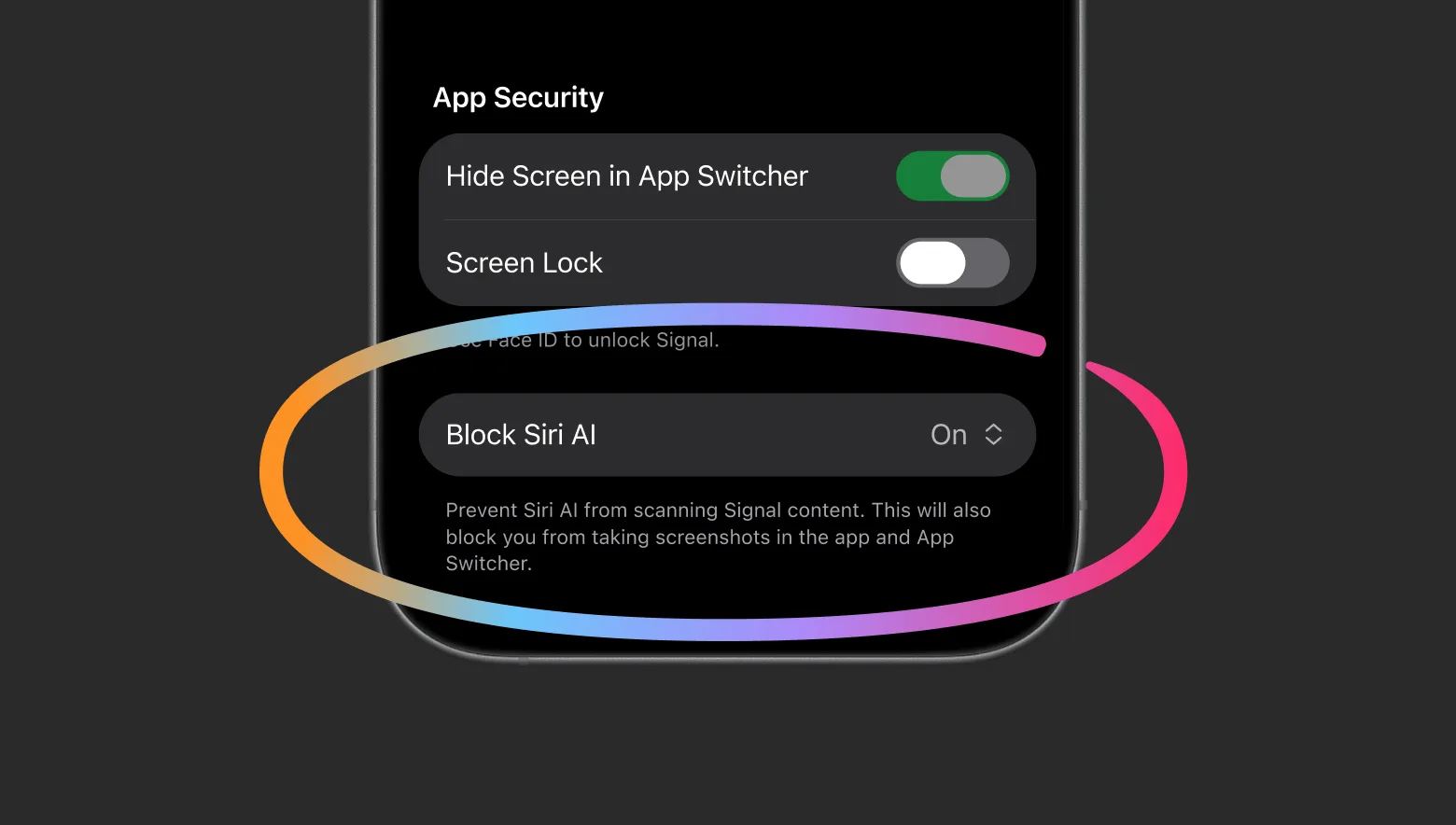
What Changes on iPhone and Android?
The two phones behave differently. On iPhone the block is always on from the start. On Android it waits until an assistant actually tries to read Signal, then switches on and tells you what happened. Signal's support page gives the details that early news reports left out, including the version numbers.
| iPhone | Android | |
|---|---|---|
| Setting name | Block Siri AI | Screen security |
| Needs | Signal 8.37+, iOS 27+ | Signal 8.35.1+ |
| On by default | Yes | Turns on when an assistant reads the screen |
| Choices | On, Off, Off for 10 Minutes | On or Off |
| If you screenshot | Message with options | No screenshot is taken |
Source: Signal Support, read November 23, 2026.
While the setting is on, it blocks three things: screenshots and screen recordings inside Signal, Signal's content showing in the recent apps list or App Switcher, and on-device assistants reading the Signal screen. Signal says it changes nothing else. Messages are encrypted the same way as before.
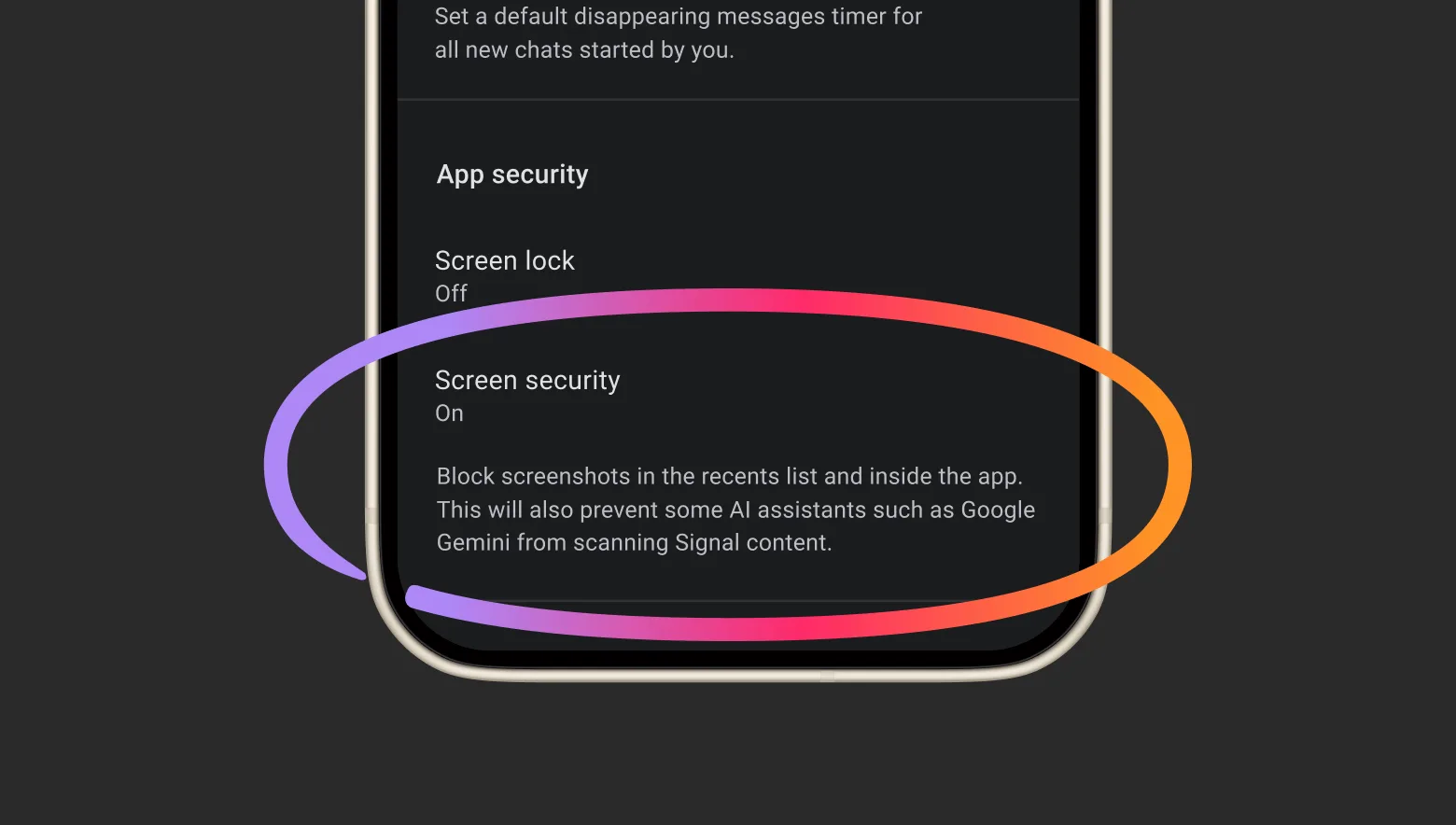
How Do You Turn the Signal Screenshot Block Off?
On iPhone, open Signal's Settings, then Privacy, then Block Siri AI, and choose Off or Off for 10 Minutes. On Android, open Settings, then Privacy, then App security, then Screen security. Signal asks you to confirm first, because turning it off means an assistant may be able to scan your chats.
Two details are easy to miss. The 10 minute option on iPhone switches the protection back on by itself, which suits a one-off screenshot of an address or a receipt. And on Android, if you turn the protection off from the pop-up instead of from Settings, Signal turns it back on after 90 days.
News reports published in the first two days disagree on where the setting lives, and at least one said Signal gave no version numbers. Signal's own support page settles both points, so use the paths above.
What Doesn't the Block Protect?
Quite a lot, and Signal says so itself. The post calls the fix "incomplete." Blocking screen capture closes one door. It does not stop an assistant or agent that reaches your messages another way, and it does nothing on the other person's phone.
| Still exposed | Why |
|---|---|
| The other person's device | If they turn the setting off, their assistant can read the chat |
| Notifications | Message previews can be read by assistants with notification access |
| Files on the device | Signal says agents could reach stored content through the file system |
| Mac computers | Signal says it can't apply these protections on macOS yet |
| Third-party agents | Apps given accessibility permissions can act like a person using the phone |
The notification gap is real. The Electronic Frontier Foundation notes that Google's Gemini can read notifications when its Device Assistance connection is enabled, and that Android has no per-app switch for screen context (EFF, October 28, 2026). Hiding message text in notification previews, a setting Signal already offers, is the simple fix.
The third-party gap made news the same week. Reuters reported that Meta's Muse agent read Signal messages on a Mac and on an Android phone by using broad permissions granted at setup, and that an Apple update then closed the Mac route. Meta told Reuters that Muse reaches other apps only through permissions users explicitly grant. Signal's post says such agents use accessibility settings "as a skeleton key." We covered how these agents work in our guide to AI shopping agents.
Android's own developer guide is also modest about the screen flag Signal relies on there. Google says it makes a screenshot come out blank, but that it "isn't reliable" against some attacks and helps on only about 70% of devices running Android 11 or older Android Developers.
Has Signal Done This Before?
Yes, on Windows. In May 2025 Signal turned on a setting called Screen security by default in its Windows 11 desktop app. It was aimed at Microsoft Recall, a feature that saves pictures of your screen so you can search your own history. Signal used a copy protection flag, the kind that stops you screenshotting a film, so Recall and every other screenshot tool got a blank image.
Signal's tone then was sharp: "Microsoft has simply given us no other option." Others followed within months. The Brave browser began blocking Recall by default in July 2025, and the ad blocker AdGuard added a Recall switch the same month Brave AdGuard.
| Date | What happened |
|---|---|
| March 2025 | Whittaker warns about AI agents at SXSW |
| May 2025 | Signal blocks screenshots on Windows 11 against Recall |
| September 2026 | Apple releases Siri AI with onscreen awareness |
| October 2026 | iOS 27.2 adds Excluded Apps for Siri AI |
| November 2026 | Signal blocks screen capture on iPhone and Android |
Whittaker has been making this case for almost two years. At SXSW in March 2025 she said an agent needs "something that looks like root permission" across your apps, and described the risk as breaking "the blood-brain barrier between the application layer and the OS layer" TechCrunch. The new block is that argument turned into a setting.
What Is Signal Asking Apple, Google and Microsoft For?
Two things. First, a simple, documented way for any app to opt out of AI access, covering screen reading, files, notifications and other routes, without breaking the app for its users. Second, clear documentation of how these assistants reach app data. Signal says its developers spent months doing "forensic investigations" on Android and iOS just to learn what was happening.
Apple has moved part of the way, but for users, not developers. Since iOS 27.2, anyone can open Settings, then Siri, then Excluded Apps, and add Signal. EFF, which had campaigned for the option, reports that Siri AI then can't read the app at all. The catch is that each person has to find the setting and switch it on. Signal wants the app itself to be able to say no on behalf of everyone in the chat.
Signal describes itself as "cautiously optimistic" that Apple and Google are engaging. Reuters' report carries no response from Apple, Google or Microsoft to Signal's post.
What Does This Mean for You?
If you use Signal, update the app and expect screenshots to fail unless you pause the setting. If you write, report or run a business on any chat app, the bigger lesson is that the screen is now a place where data can leak, and each app has to defend itself.
- Signal users: keep the block on, and use the 10 minute pause when you need a screenshot.
- Journalists and researchers: sources may no longer be able to send you screenshots of chats without changing a setting. Tell them how, or ask them to forward the message instead.
- Anyone with an AI assistant: on iPhone, add private apps to Excluded Apps. On Android, review what Gemini can reach under Connected Apps and screen context.
- Site and app owners: the same shift is changing how people browse, as we saw with Reddit's login requirement and Google's Android XR glasses. Assume assistants will read what people see.
What Don't We Know Yet?
- How well it works. No independent test has yet shown the block stopping Gemini or Siri AI on a range of phones. Signal says Android detection doesn't work on every version.
- The platform makers' answer. Apple, Google and Microsoft haven't publicly said whether they will give developers an opt-out.
- Mac protection. Signal gives no date for macOS.
- How many people are affected. Signal doesn't publish user counts. Its post says "many millions."
- Whether other apps follow. No other major messaging app has announced the same default.
How to Cite
Writers are welcome to quote the facts and tables on this page. Please credit BestWebsiteTemplate.com and link to this page. The original sources for each fact are linked beside it.