10 Best Free & Paid Framer Art & Design Website Templates 2026


Framer's art and design templates have matured significantly. We've tested the top options—from minimalist portfolios to animation-heavy showcases—and found templates that actually handle the technical complexity designers face. Here are the 10 best, with honest takes on what each does exceptionally well.
Framer's art and design template ecosystem has evolved considerably over the past year. Where templates used to feel like decorative afterthoughts, they've become genuinely capable tools for serious creative professionals. The difference shows in how designers are actually using them—not just for basic portfolio display, but for interactive project showcases, dynamic case study layouts, and custom animation sequences that would normally require months of development work.
I've spent the last several months working directly with Framer templates across multiple client projects, and I can tell you the gap between a mediocre template and a great one comes down to three concrete factors: how well the CMS system handles your content structure, whether the animation framework supports your creative vision without becoming a technical burden, and honestly, whether the creator actually understands how designers present work. That last point matters more than you'd think. A template built by someone who's never had to explain their process through a portfolio will show.
The 10 best free & paid Framer art & design website templates we're featuring here represent different philosophies—some prioritize minimalist elegance, others embrace color and movement, and a few hit that rare sweet spot of being both technically flexible and visually distinctive. Whether you're launching a solo practice or representing a small agency, you'll find something here that genuinely solves a problem.
What to Look For in Art & Design Templates
Art and design portfolios need CMS capabilities that go beyond basic text fields. You're not writing blog posts; you're organizing projects with multiple images, videos, dimensions, and context. The template should let you create a flexible project structure without forcing every piece into the same template. Templates like elias and pastel-lab handle this differently, but both succeed because they started with the content model first.
Animation matters, but only if it serves the work itself. This is where many templates fail—they prioritize flashy interactions that distract from your actual projects. The best templates use animation strategically: smooth image transitions, subtle hover states, and scroll-triggered reveals that enhance rather than overshadow. Sticky scrolling, custom cursors, and 3D transforms are valuable, but only if they feel like a natural extension of your design language.
Responsive design isn't optional for visual work. Your portfolio needs to look intentional on mobile, not like a crushed desktop version. Every template here handles responsive layouts, but the quality varies significantly. Some templates rethink the layout for smaller screens; others simply scale. That distinction matters when you're sending portfolio links to potential clients.
Typography and component systems signal whether the template was designed by someone who understands design fundamentals. Clean variable fonts, readable hierarchy, and a genuine component system (not just repeated sections) tell you the creator invested in the architecture, not just the aesthetics.
The Best Framer Art & Design Templates Right Now
🏆 elias — The gold standard for serious portfolios
- ⭐ Overall Score: 9.5/10
- 🎨 Design: 9.5/10
- ⚙️ Development: 9.5/10
- 💰 Price: $79
elias is what happens when a designer understands both their own needs and how to build for others. The template uses bold typography as its primary visual language—no heavy graphics, no animation just for the sake of it. Instead, you get a CMS system that treats your projects as the star, variable fonts that actually respond to content, and custom cursors that feel like a personal detail rather than a gimmick. The monochrome/light aesthetic works particularly well if your work is conceptual or photography-focused, though the customization depth means you're not locked into that direction.
What makes elias stand out technically is the component architecture. Every major section—from project cards to the about layout—is built as a reusable component. This means when you want to adjust spacing or typography, you're changing it once, not hunting through multiple sections. The responsive design adapts thoughtfully on mobile; the layout doesn't just shrink, it restructures. The 404 page, contact form, and navigation are all built to the same quality standard as the hero, which tells you the creator wasn't cutting corners on the "invisible" pages.
The animation work is restrained by design. You get subtle transitions and thoughtful scroll behavior, nothing that makes viewers wait for transitions to finish before they can read text. Created by Alexandre Herbigneaux, this template feels like working with someone who's been a working designer, not someone who learned to build templates.
> Best for: Photographers, architects, concept designers, and agencies who want their work to speak louder than the website itself
pastel-lab
- ⭐ Overall Score: 9/10
- 🎨 Design: 9/10
- ⚙️ Development: 9/10
- 💰 Price: $49
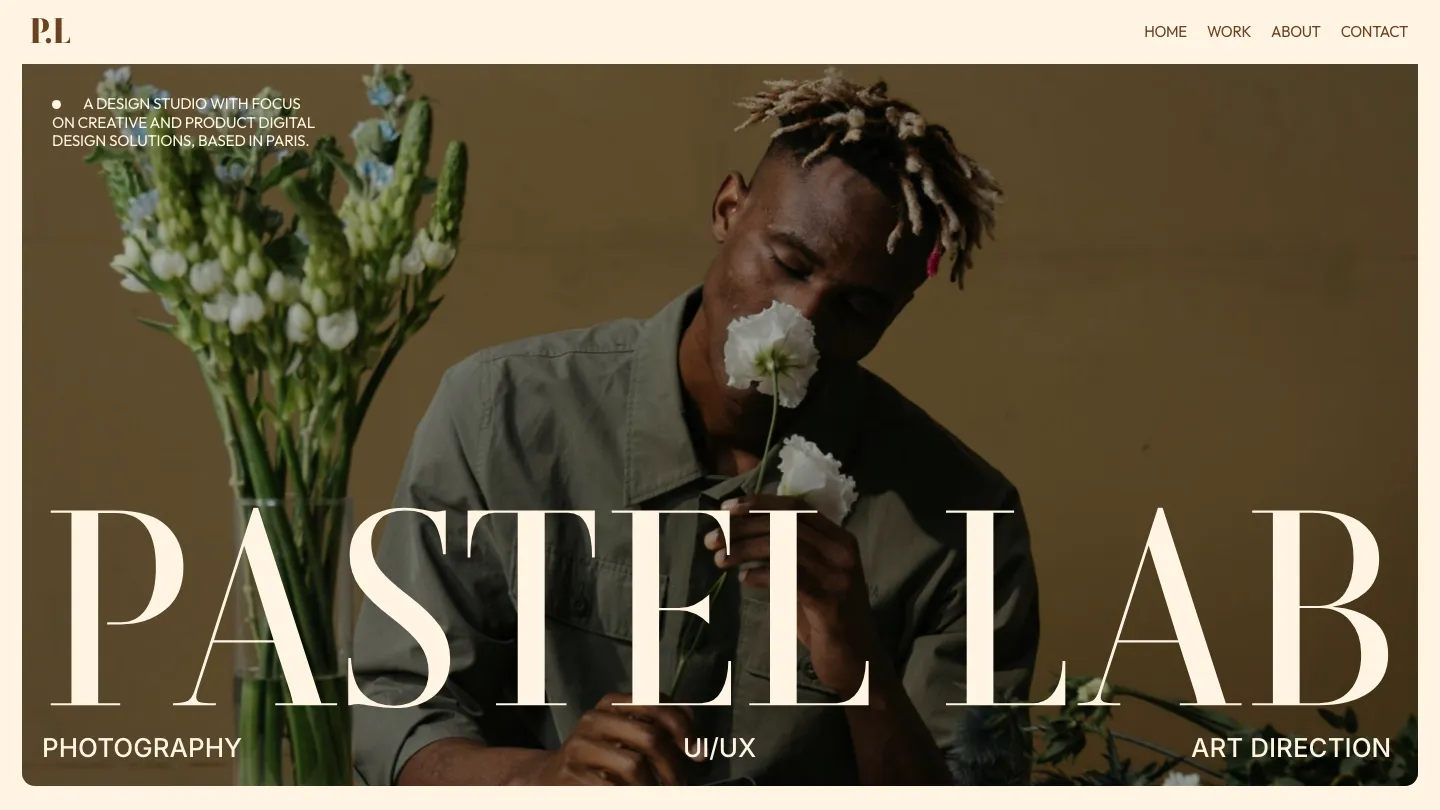
Pastel-lab proves you don't need to choose between playful and professional. The color palette—soft pastels with intentional contrast—immediately signals this is designed by someone who thinks about how color affects perception. This template works particularly well if your practice involves motion design, illustration, or any field where demonstrating personality is part of your professional value. The CMS structure handles multiple project types (case studies, process work, finished pieces) without forcing a single format.
The component system is thoughtfully built. You get multiple project card variations, flexible about and services pages, and a contact form that's actually styled to match the rest of the template (rare enough to mention). Animation is present but purposeful—images fade in as you scroll, text appears with timing that respects readability. The responsive behavior shifts the multi-column layouts to stacked on mobile without feeling cramped. Anais Iris designed this template with accessibility in mind; contrast ratios are solid, form fields are large enough, and interactions don't rely on hover states that mobile users can't trigger.
One real limitation: if your visual language is dark or monochromatic, you'll want to significantly customize the color system. The template's identity is tied closely to its pastel aesthetic, which is beautiful but distinctive.
> Best for: Motion designers, illustrators, and creative professionals who want their personality represented in their portfolio site
brave-studio
- ⭐ Overall Score: 8.5/10
- 🎨 Design: 9/10
- ⚙️ Development: 8/10
- 💰 Price: $49
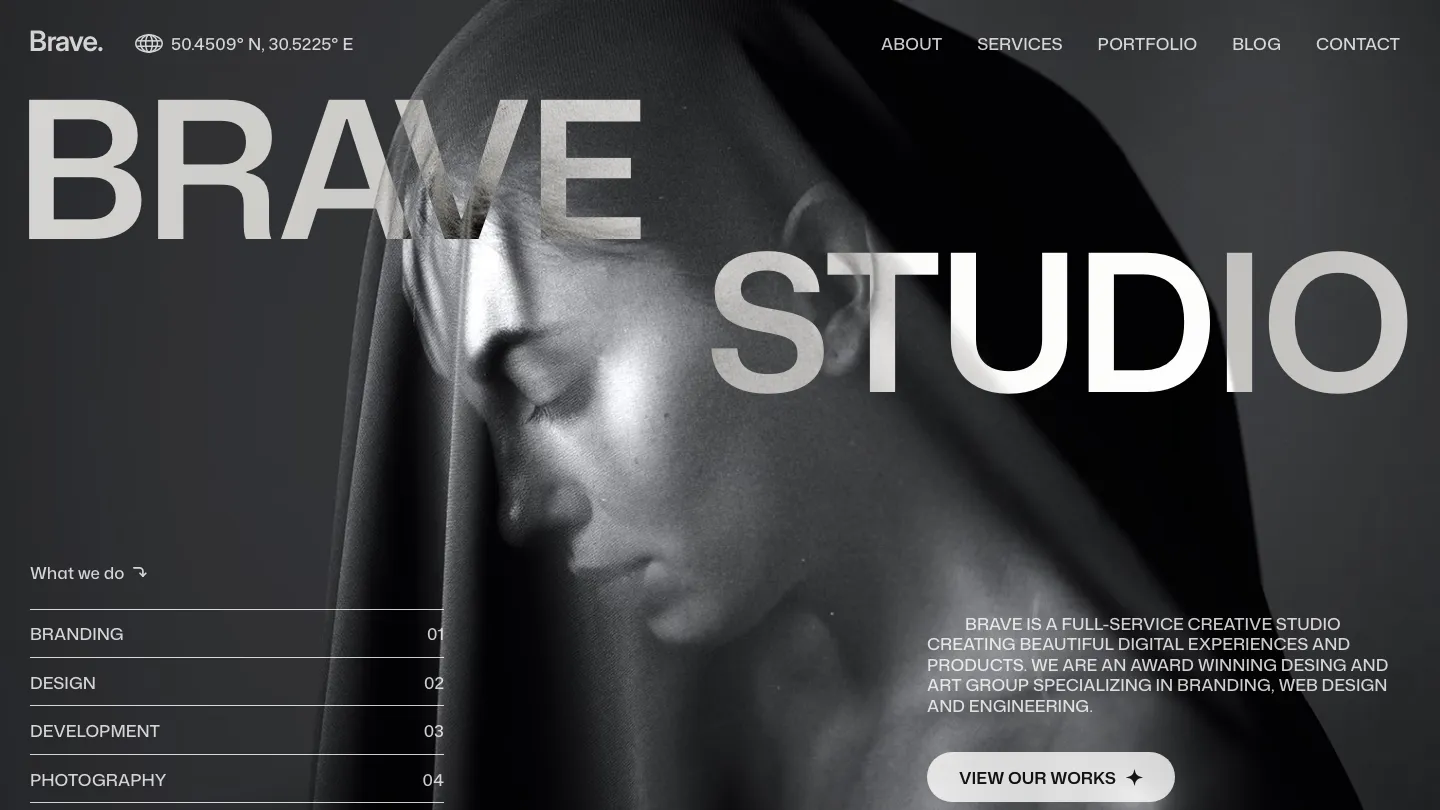
Brave-studio is the option for designers who want advanced interactions without the development overhead. The template includes 3D transforms, custom cursors, sticky scrolling, and slideshows—all the technical features that usually require heavy customization—already built and ready to adapt. The modal system works smoothly, perfect if you want to showcase work in lightboxes without bouncing between pages. The blog feature is genuinely functional, which is helpful if you're combining portfolio with writing.
Framer Box designed this with enough flexibility that you're not fighting against the template's opinions. The typography hierarchy is clear, the spacing breathes, and the layout templates offer real variety. Animation intensity is moderate—you get motion, but it doesn't feel like you're using a template built purely to showcase animation capabilities. The services page template is particularly useful if you're positioning this as an agency site rather than just a personal portfolio.
The caveat: with this many features, the template asks more of you during setup. You'll want to spend time understanding which components you actually need and which ones you're inheriting by accident. The development score is slightly lower because some of the fancier interactions (sticky scrolling with large hero sections) can feel heavy on slower connections.
> Best for: Agencies and designers who want a feature-rich template without constant customization work
artemis
- ⭐ Overall Score: 8.25/10
- 🎨 Design: 8.5/10
- ⚙️ Development: 8/10
- 💰 Price: Free
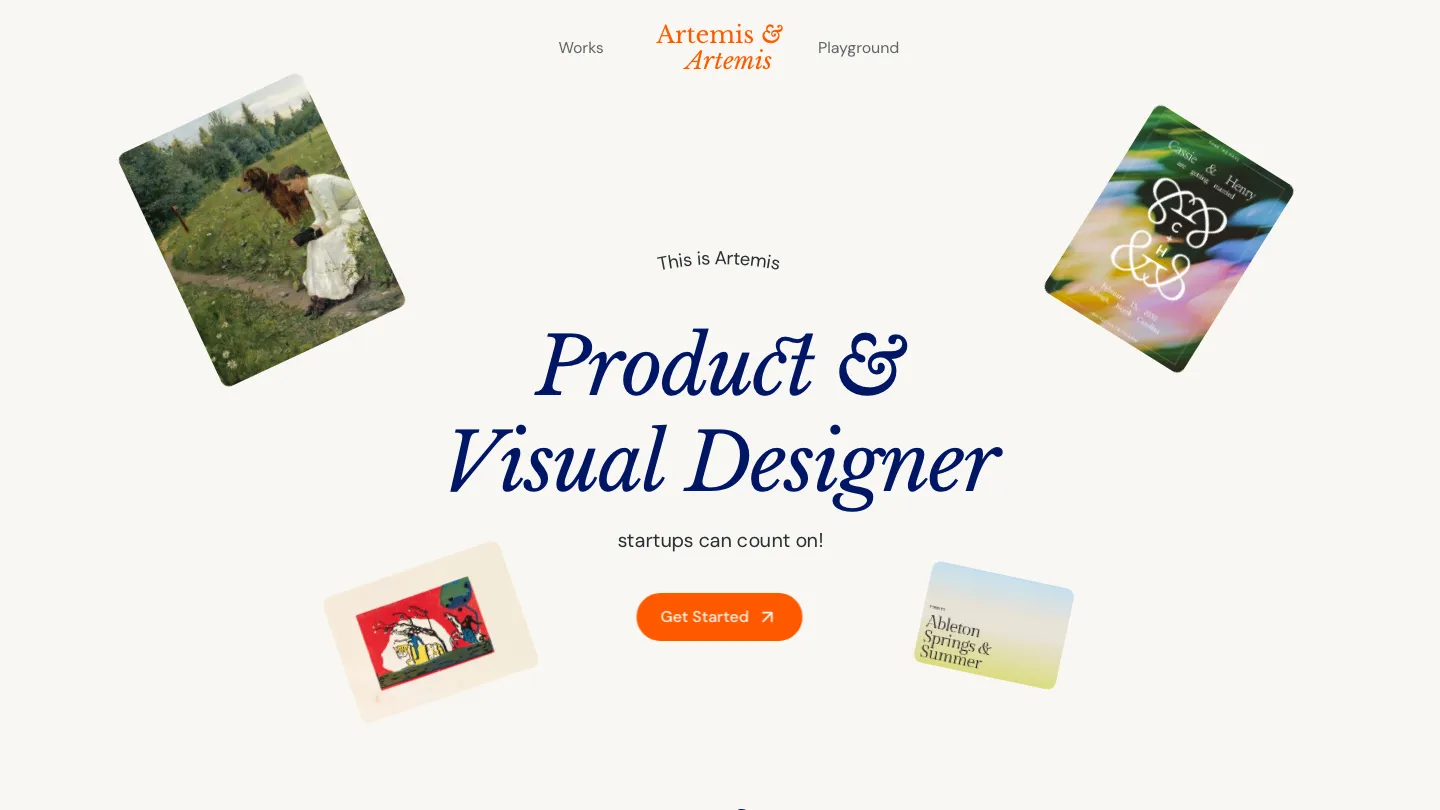
Artemis is the free template that doesn't feel like a compromise. Neueframe built this with genuine attention to detail—the typography work is clean, the spacing is intentional, and the structure actually respects how portfolios should function. You get a CMS system for projects, a proper about page, contact form, and services listing. The animations are subtle; the responsive design adapts thoughtfully. For a free template, the quality is genuinely impressive.
The main value of artemis is that it removes the barrier to entry. You're not paying to test whether Framer is the right platform for your portfolio, and you're not getting a template that punishes you for not spending money. The design is modern and professional without leaning so heavily into trends that it'll look dated in a year. The minimal aesthetic means you're not paying a visual debt to the template designer's preferences.
Where it falls short compared to paid options is customization depth and animation sophistication. The template is more rigid; if you want to substantially change the layout philosophy, you'll be doing more work. There's no blog feature, no pricing page template, and the feature set is intentionally streamlined. This is actually fine—it means less to learn—but if you need those pieces, you'll add them yourself.
> Best for: Freelancers testing Framer, photographers wanting a clean standard portfolio, and designers on a tight budget who refuse to sacrifice quality
bora-bora
- ⭐ Overall Score: 8.25/10
- 🎨 Design: 8.5/10
- ⚙️ Development: 8/10
- 💰 Price: Free
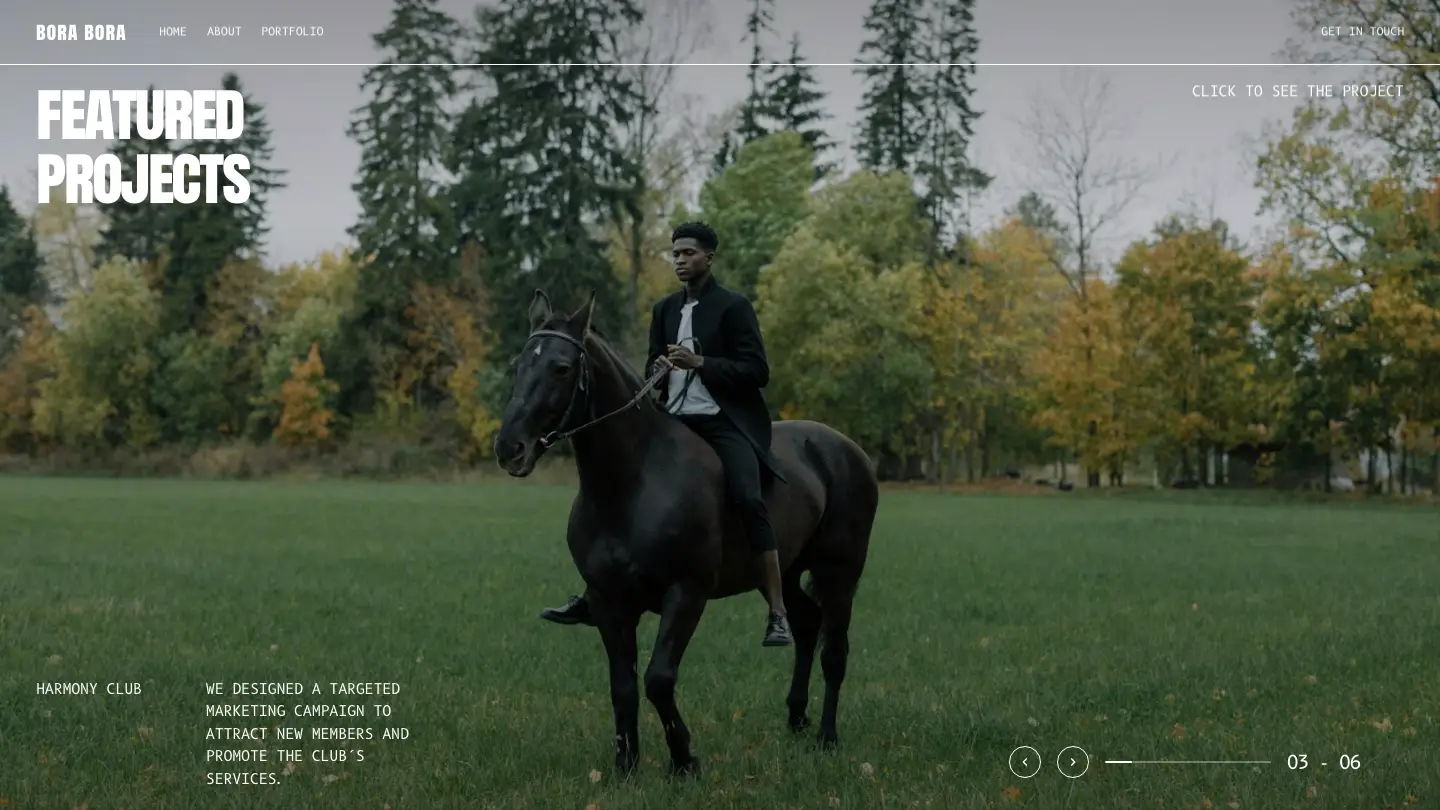
Bora-bora takes a different free template philosophy—it's built for designers who want animation and interactivity without needing to code. Sofiane Izabachene packed this with 3D transforms, slideshows, sticky scrolling, and layout templates that actually give you variety. The grid-based aesthetic works well for visual-heavy portfolios, and the component system means you can build out new sections using existing pieces. The animation framework is more ambitious here than in artemis, which is both a strength and something to be mindful of.
What makes bora-bora special is that it doesn't hide its capabilities behind advanced settings. The slideshows work smoothly, the 3D transforms feel natural rather than forced, and the overall interaction model respects user expectations (nothing weird happens when you hover or scroll). The typing is consistent, the color system is flexible, and the CMS handles multiple project formats. For a free template, this is genuinely competitive with paid options in some categories.
The tradeoff: with more features comes more complexity in the file structure. You might inherit components you don't need, and the animation focus means this template has a particular energy that doesn't suit every designer's aesthetic. If you want subtle and minimal, this leans more animated and interactive.
> Best for: Motion designers, animators, and creative professionals who want their site to demonstrate technical capability alongside their work
bebold
- ⭐ Overall Score: 8.25/10
- 🎨 Design: 8.5/10
- ⚙️ Development: 8/10
- 💰 Price: $99
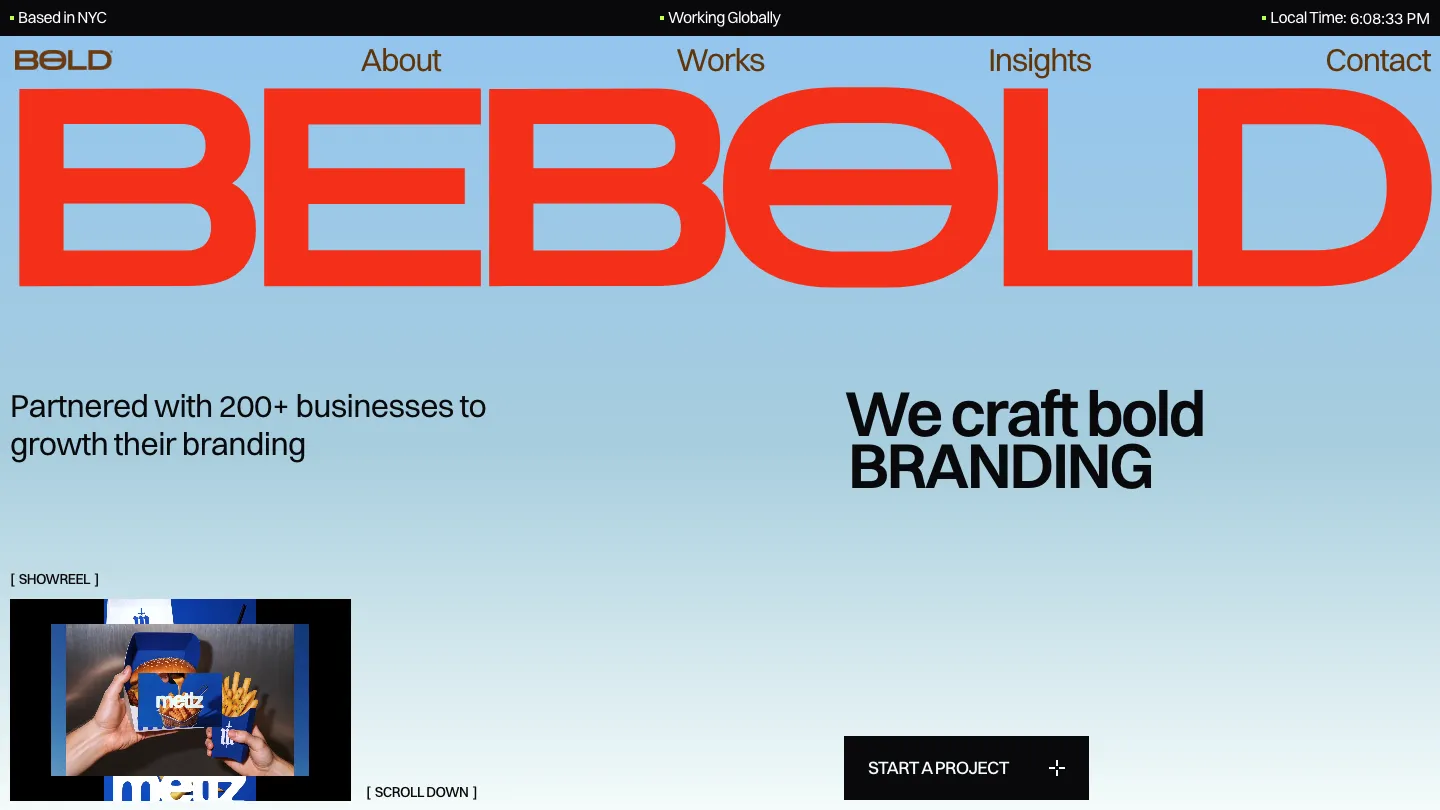
Bebold is built for designers and agencies who want maximum flexibility without maximum complexity. Thanh Tran designed this around a grid-based aesthetic that feels contemporary without being trendy. The template includes a blog system, pricing pages, and job listings—useful if you're positioning this as an agency site. The CMS is sophisticated enough to handle various content types without forcing everything into one template.
The component library here is genuinely useful. Custom cursors, rich media handling, sticky scrolling elements, and layout templates all work together to create variety across your site. The colorful and minimal style options mean you can push the design in different directions depending on your practice. Form handling is solid, and the responsive design adapts intelligently. The animation work is present but not overwhelming; scrolling through the site feels smooth rather than precious.
The $99 price point puts this in a middle tier—more investment than the free options, but less than specialized templates. You're paying for the flexibility and comprehensive feature set. The blog feature is useful if you're doing content marketing, though it adds complexity if you don't need it. The development quality is solid across the board, nothing feels like an afterthought.
> Best for: Small agencies, freelancers with multiple service offerings, and designers who want to include case studies alongside their main portfolio work
ecliptix
- ⭐ Overall Score: 8/10
- 🎨 Design: 8/10
- ⚙️ Development: 8/10
- 💰 Price: $99
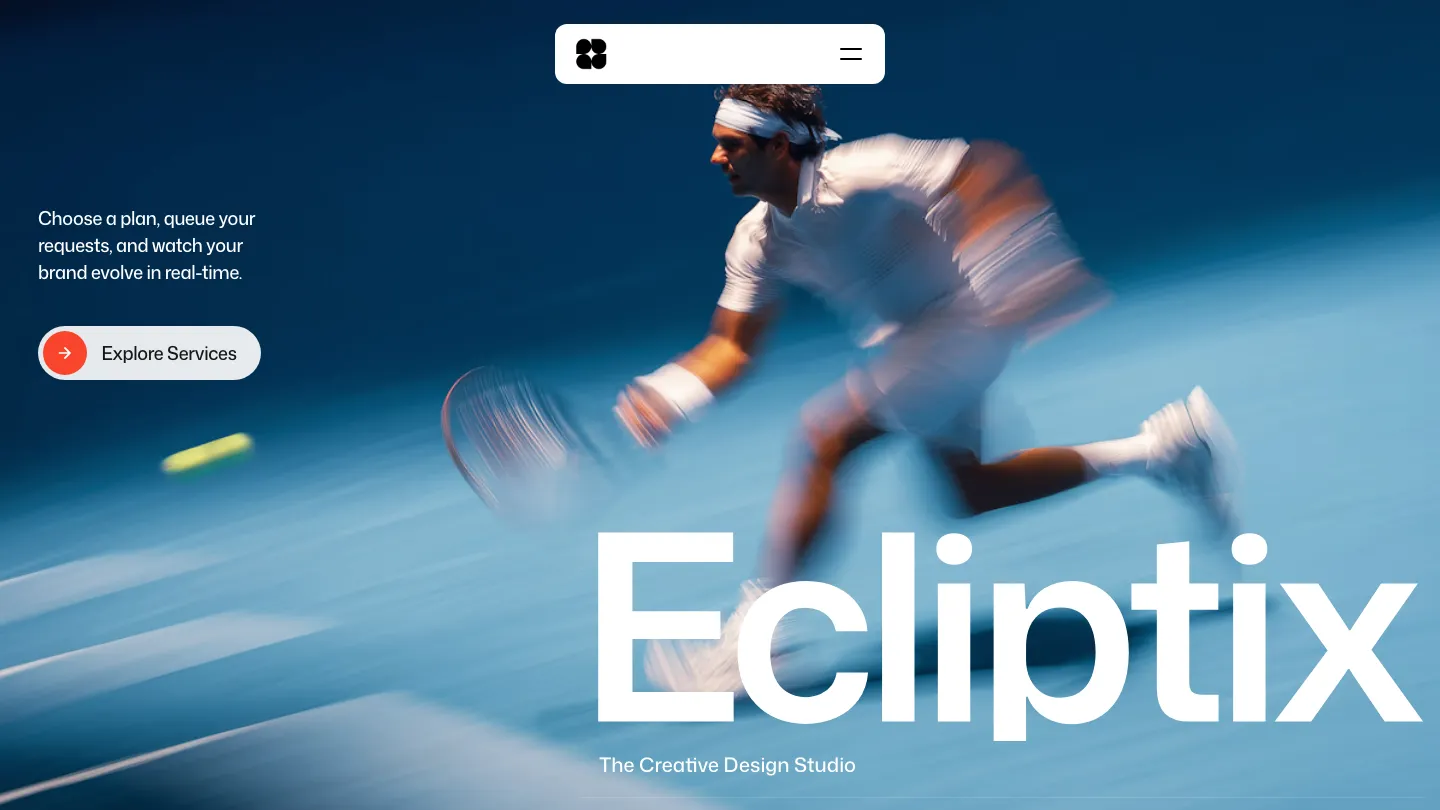
Ecliptix approaches the premium template space from a different angle than bebold—it's built for studios and agencies that want the site itself to be an extension of their brand work. Vinayak Thakur created this with grid-based layouts and professional styling that feels like it belongs to a competent design practice. The template includes blog, pricing, and jobs listings, making it suitable for agencies posting positions and content regularly.
What sets ecliptix apart is the layout variety. You're not working with minor variations of a single layout philosophy; different sections feel genuinely distinct while maintaining cohesion. The sticky scrolling and slide shows are implemented thoughtfully, and the animation is restrained enough that it never interrupts your ability to scan content quickly. The component system is organized intuitively, which matters when you're working across multiple sections.
This template works particularly well if your practice involves teaching, writing, or thought leadership alongside client work. The blog integration doesn't feel bolted-on; it's part of the overall information architecture. The pricing page template is clean and easy to customize. The jobs section suggests this was built with growing teams in mind.
> Best for: Design studios, agencies planning to share team information, and professionals building authority through content and case studies
naoto-studio
- ⭐ Overall Score: 8/10
- 🎨 Design: 8/10
- ⚙️ Development: 8/10
- 💰 Price: $49
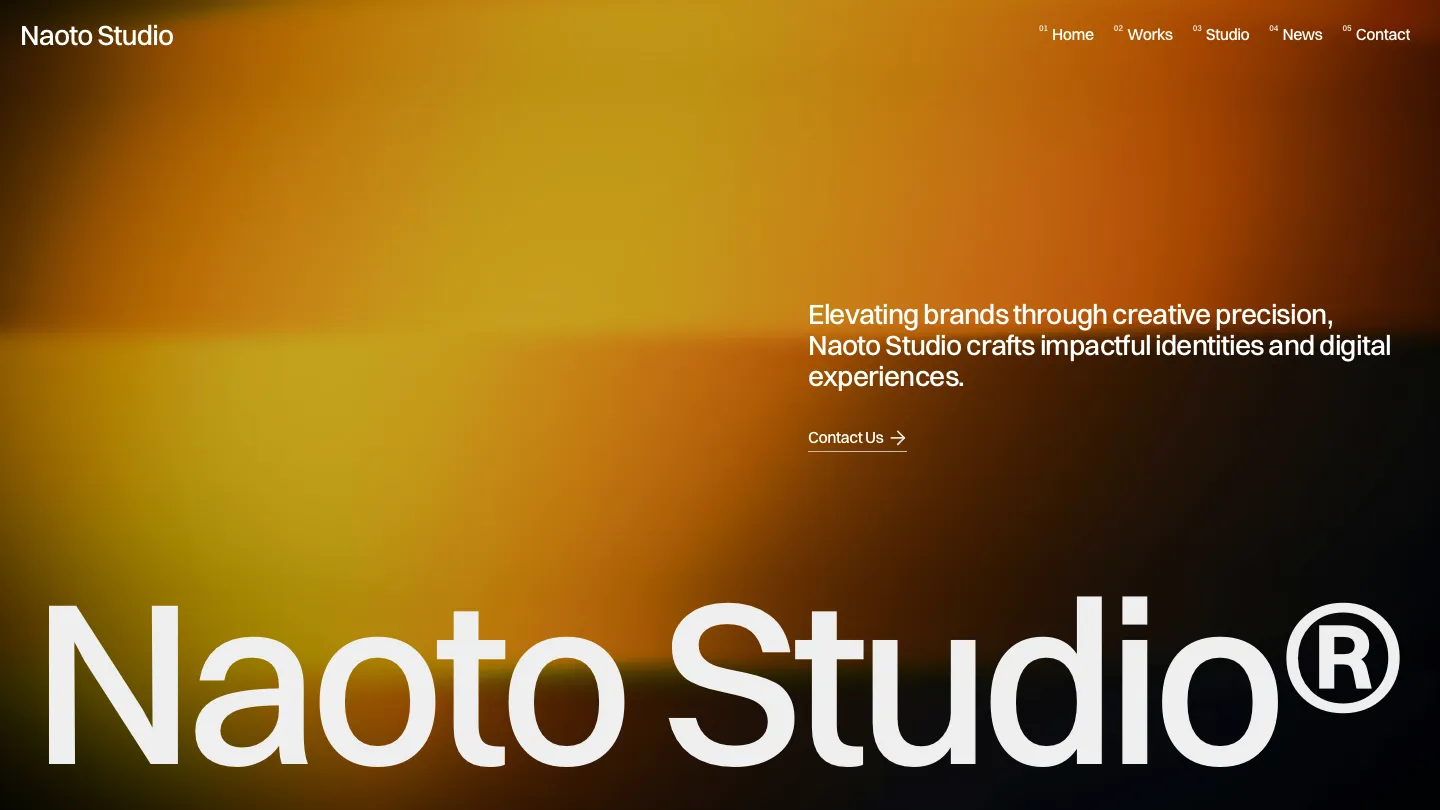
Naoto-studio finds the right balance between feature completeness and design clarity. Flowit Supply created this with monochromatic styling and clean typography that prioritizes your work over the template's design language. The CMS handles projects, the blog works, the services and pricing pages are included, and the custom cursor detail adds personality without distraction. The layout templates offer real variety—not just minor styling shifts, but genuinely different approaches to organizing content.
What's valuable here is the development quality at a $49 price point. The template feels put-together; nothing feels like a quick addition to hit a feature checklist. The responsive design restructures thoughtfully on mobile, the form handling is solid, and the animation (smooth transitions, subtle hover states, overlay modals) works without drawing attention to itself. The sticky scrolling implementation respects performance.
One specific note: if your visual language relies on color, you'll need to customize the color system significantly. The template's identity is tied to its monochromatic approach, which is clean but limiting if you want something different. That said, the CSS structure is logical, and customizing it is straightforward.
> Best for: Minimalist designers, photographers, and studios wanting a professional template that gets out of the way
pokota
- ⭐ Overall Score: 8/10
- 🎨 Design: 8.5/10
- ⚙️ Development: 7.5/10
- 💰 Price: Free
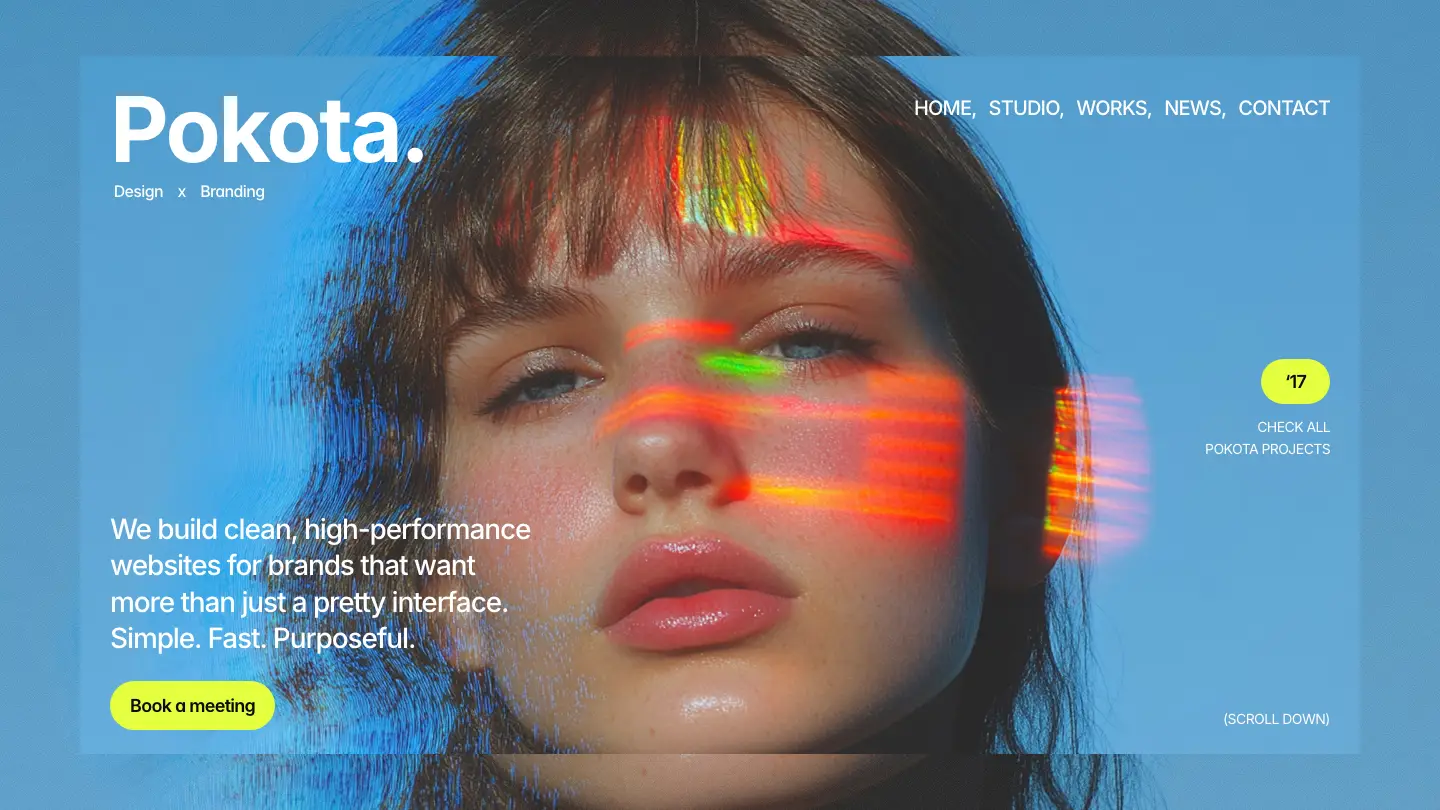
Pokota is the colorful free option—if you want personality baked in from the start. Jakke Dea built this with vector sets and P3 color support, which tells you the creator cares about visual richness without sacrificing technical accuracy. The template includes rich media handling, slideshows, and sticky scrolling, making it feature-rich for a free template. The services and pricing pages are included, useful if you're representing multiple offerings.
The design here leans modern and professional while embracing color in a way that feels intentional rather than overwhelming. The component system includes layout templates that give you real building blocks rather than variations of a single approach. The animation work is present—slideshows transition smoothly, scroll-triggered reveals work—without feeling like a demo of capabilities. The CMS structure handles multiple project types comfortably.
The development score is slightly lower because some of the animations can feel heavy, and there's more complexity in the file structure than the truly minimal free templates. You're inheriting more components, which is powerful but requires you to be thoughtful about what you actually need. The setup process is longer than artemis, though the payoff is a more feature-complete result.
> Best for: Creatives who want personality in their portfolio, designers in fields where color and visual richness matter, and anyone wanting a genuinely capable free template
🏆 yuto — Best for photographers and video professionals
- ⭐ Overall Score: 8/10
- 🎨 Design: 8/10
- ⚙️ Development: 8/10
- 💰 Price: $49
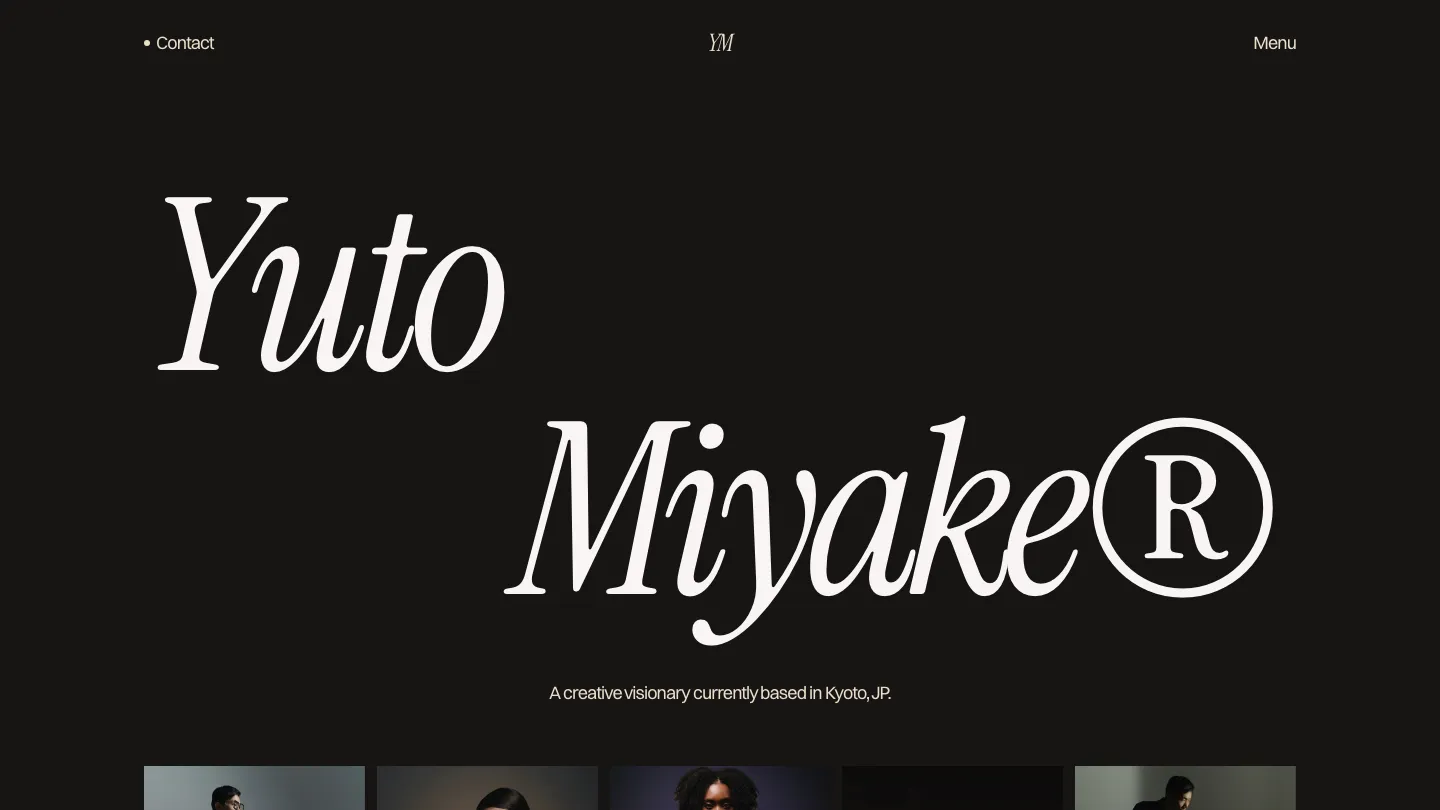
Yuto is purpose-built for photographers and videographers, which means it understands how to showcase visual work. Vibrant Digital created this template with a clean, minimal aesthetic that genuinely lets your images breathe. The dark and light theme toggle is a nice detail—not necessary, but thoughtful, and it gives you flexibility in how you present work depending on the project. The CMS structure is optimized for image-heavy portfolios; the project template doesn't force you into a narrative-first format.
The responsive design on yuto matters more than most templates because your work might be viewed on phone screens at coffee shops and on desktop browsers during presentations. The layout adapts intelligently, and the image scaling preserves aspect ratios without awkward cropping. The modals and overlay system work smoothly for gallery presentations. Custom typography and animation keep the site feeling intentional rather than sterile.
The sticky scrolling and modal system deserve specific mention—they're implemented in ways that feel natural for visual portfolios. You're not watching the site show off its capabilities; you're using tools that make sense for how photographers present work. The form handling is straightforward, perfect if you're accepting client inquiries or mailing list signups.
> Best for: Photographers, videographers, cinematographers, and visual professionals who want their site to function as a professional gallery
How to Choose
Start by sorting templates into two categories: what you actually need and what you'd like to have. Do you need a blog? A pricing page? Job listings? Most designers overestimate what they need initially. Templates like artemis and bora-bora work perfectly well without those features; templates like bebold and ecliptix excel if you do want them. Don't pay for features you won't use—that just adds complexity to your site and your workflow. If you're purely showcasing visual work, a minimal template (elias, naoto-studio) often outperforms feature-heavy options. If you're building authority through writing and case studies, ecliptix or bebold make sense. The 10 best free & paid Framer art & design website templates here range from $0 to $99, so budget isn't the determining factor.
Consider your design language and whether the template's aesthetic works for you or requires substantial customization. Pastel-lab requires a different kind of commitment than artemis; bora-bora's animation energy is different from yuto's minimal approach. If a template's visual direction feels wrong, you'll either customize heavily (adding hours to your setup) or resent the final result. Spend 10 minutes imagining your projects actually live in each template—not a generic project, but your real work. Which templates feel like natural homes for what you create? That's your shortlist. Then factor in specific needs: if you photograph interiors, yuto's image-first approach might matter more than bebold's blog system. If you're a motion designer, brave-studio or bora-bora's animation capabilities make more sense than elias's minimalist restraint.
Our Top Pick
Elias deserves the top recommendation because it actually solves the problem most designers face: how to build a professional portfolio site without that site becoming a distraction from your work. The template doesn't announce itself; it gets out of the way and lets your projects speak. The technical execution is exceptional—the CMS structure respects how designers think about content, the component system means you're not maintaining seventeen different layouts, and the animation work enhances rather than showcases.
At $79, elias represents genuine value. You're paying for thoughtful architecture and a creator (Alexandre Herbigneaux) who clearly understands both design and development. The template works beautifully at every screen size, from mobile browsing to the large displays where your work might be presented during meetings. The typography system is flexible enough that you can push your visual language while maintaining the template's inherent polish. If you're serious about your practice and want a portfolio site that reflects that seriousness, elias is where to start.
That said, if your budget is tighter, artemis delivers surprising quality for free, and pastel-lab offers a genuinely different aesthetic at half the price of elias. If you need more features (blog, pricing, jobs), bebold or ecliptix are smarter choices. But if your priority is a portfolio that looks intentional and functions flawlessly, elias wins.
Finding the right Framer template matters because your portfolio is often your first impression with potential clients and collaborators. The templates above represent the current best options in the Art & Design category—each one solves different problems for different practices. If you're open to other platforms, the approaches we've covered here translate to other systems too. We've reviewed similar territory with Webflow and Shopify as well, and the principles remain consistent: prioritize CMS structure, evaluate animation honestly, and choose templates that enhance your work rather than compete with it.